Administration – Integrations tab
Integrations
Last updated: 28 October 2026
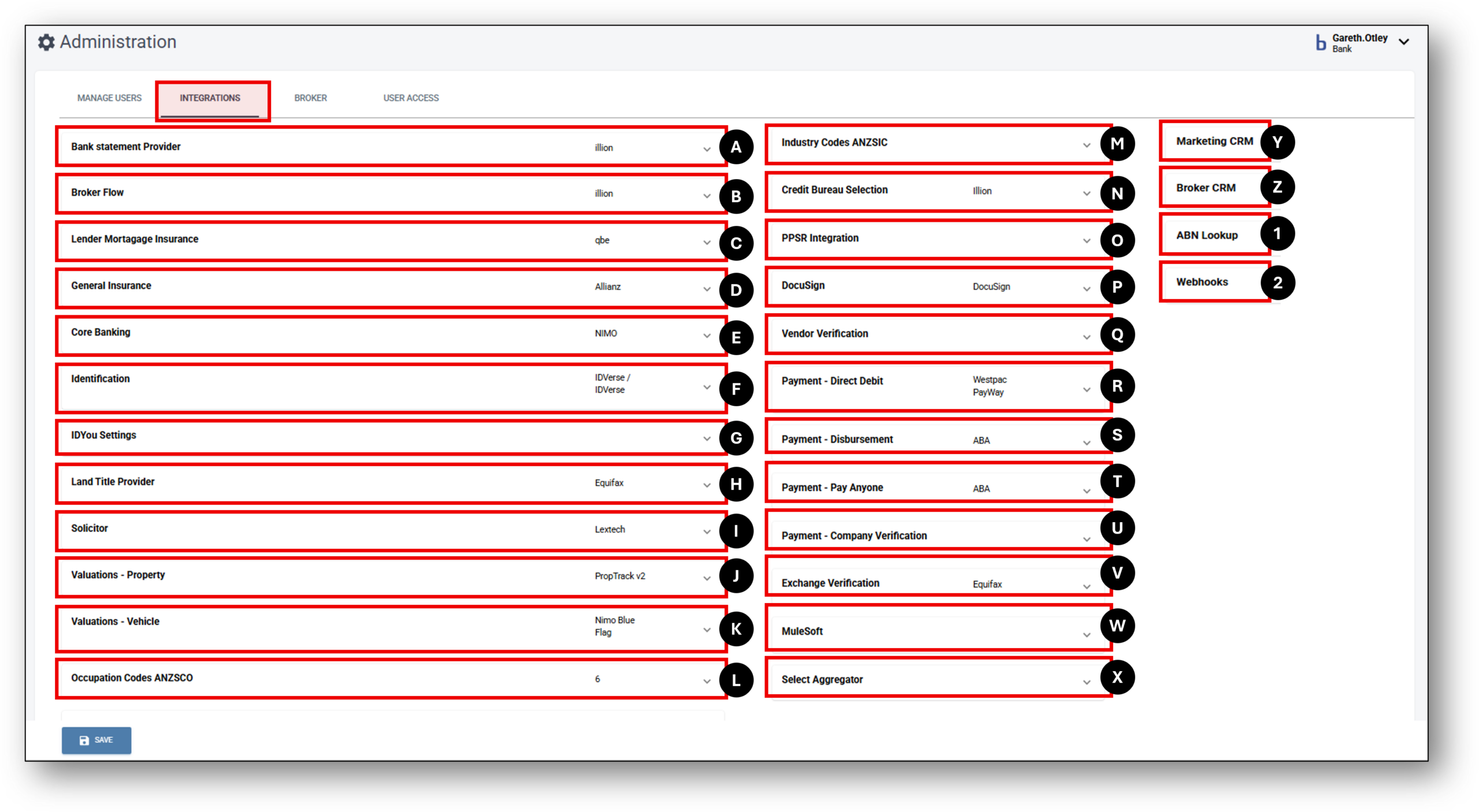

Credentials
Each integration requires unique credentials to complete the connection into Nimo. These are obtained by your organisation from the Integration provider. Nimo is set up to house each of the bespoke credential input requirements with matching fields with what your intergration provider will supply you with.
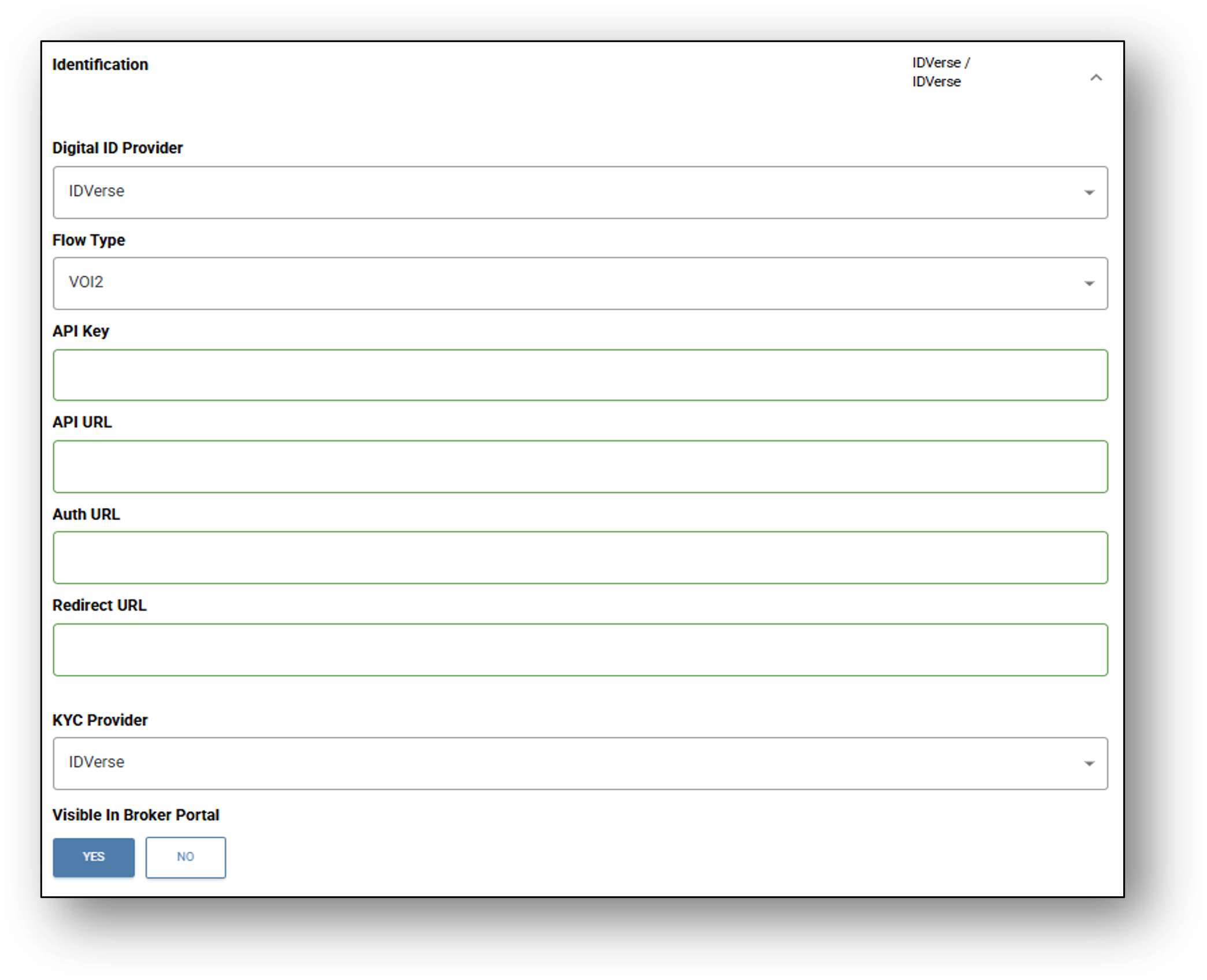
For Example: An integration in the Identification category for ID Verse has the following fields (as seen in the image below) after selecting “ID Verse” in the Digital ID Provider drop-down:
- Flow Type
- API Key
- API URL
- Auth URL
- Redirect URL
- KYC Provider
Yes/No Switch: To make the IDVerse Integration availble in the Broker Portal
It’s important to note, that each integration input gateway is specifically designed as per the service providers requirements and the same codes will not work across different credential entry points – They are in fact unique to your organisation and that integration. You should never share your credentials outside of your organisation.
Integrations
Nimo manages integrations with third party services (valuations, ID verification, credit bureaus, solicitors, payments) on your behalf. Nimo brings together more than 55 best-in-breed 3rd party services spanning across your entire connected ecosystem.
(A) – Bank Statement Provider
This integration connects with third-party APIs to securely retrieve a customer’s recent bank transaction history. The data is used to verify income sources, identify spending habits, and assess the customer’s financial capacity during the loan application process. By automating this step, businesses can make more accurate credit assessments, reduce manual document handling, and speed up decision-making, all while ensuring a smoother and more transparent experience for the customer.
(B) – Broker Flow
This integration supports broker-assisted applications by allowing seamless data sharing between external broker systems and the Nimo platform. It enables brokers to submit applications on behalf of customers, with key information, such as personal details, loan preferences, and financial data, automatically pre-filled and imported into Nimo. This ensures consistency, reduces data entry errors, and improves tracking throughout the application journey. It also allows businesses to monitor broker activity, maintain compliance, and streamline communication between brokers and internal assessment teams.
(C) – Lender Mortgage Insurance
The LMI integration in the Nimo platform enables lenders to connect directly with providers such as QBE to manage LMI requests within the loan lifecycle. When the Loan-to-Value Ratio (LVR) exceeds 80%, the platform automatically makes the Request LMI option available during the Assessment stage, in line with Australian lending requirements.
Through the integration, lenders can configure underwriting types (e.g., Standard or Standard and eDUA) and submit applications directly to QBE via a guided form. Key borrower details are pre-populated from the loan application, while additional inputs (e.g., underwriting type, negative gearing benefit, genuine savings, external assets, liabilities, and income breakdown) are captured through the QBE Additional Details form.
Once submitted, the system handles the end-to-end process: sending the request to QBE, retrieving results, and attaching policy documents back to the loan application. This automation reduces manual effort, ensures compliance, and streamlines how lenders safeguard higher-risk loan.
(D) – General Insurance
This integration allows lenders to connect with external general insurance providers through the Nimo platform. It supports insurance types commonly required during loan settlement, such as property, vehicle, or asset insurance. When a loan application progresses to the relevant stage, the platform can use borrower and asset details to request quotes from the provider. Staff or customers can then review the available options, select a suitable policy, and proceed with binding. Once confirmed, the insurance policy documents are automatically stored within the application record. This streamlines the settlement process, reduces manual effort, and ensures compliance with lending requirements.
(E) – Core Banking
This integration connects the Nimo platform with the business’s core banking system, enabling secure, real-time exchange of customer and account data. It allows Nimo to read and write key information, such as customer profiles, loan details, and repayment schedules, directly to the core system. Through this connection, loan status updates are automatically synced, ensuring both systems remain aligned throughout the application lifecycle. Additionally, the integration can trigger critical events like account creation, fund disbursement, and repayment setup once a loan is approved. This reduces manual handling, improves data accuracy, and ensures a seamless handover from loan processing to live servicing within the bank’s operational infrastructure.
(F) – Identification
APIs in this category enable the Nimo platform to digitally verify an applicant’s identity through various secure methods, such as document uploads, facial biometrics, and real-time checks against government databases. Applicants can submit identification documents (like passports or driver’s licences), which are scanned and validated using OCR and image recognition tools. Additionally, facial recognition and liveness detection confirm that the person submitting the application matches the ID provided. These integrations help businesses meet Know Your Customer (KYC) requirements, reduce fraud risk, and streamline onboarding by eliminating the need for manual identity checks. The process is fully digital, fast, and compliant with industry regulations.
(G) – IDYou Settings
How to set-up access in two easy steps:
Visit the IDyou Web-App and make sure to bookmark it in your favourites for easy access in the future.
-
Login using your username and password.
How it’s done:
-
Download your remote VOI user guide
If you have any questions, contact our team via email at idyousupport@msanational.com.au and we will get back to you within the hour.
IDyou Support Team
T 02 8719 4000
F 02 8719 4040
E IDyouSupport@msanational.com.au
(H) – Land Title Provider
This integration connects the Nimo platform with national or state-based land title registries, allowing automated access to verified property data. It retrieves critical information such as property ownership, lot and plan details, zoning classifications, and encumbrances. This data is essential for assessing the security of a property during the home loan approval process. By pulling this information directly from official registries, the integration ensures accuracy, speeds up the valuation and assessment process, and reduces reliance on manual searches or third-party reports. It also supports compliance by providing a verifiable source of property details used in credit decisions.
(I) – Solicitor
This integration streamlines communication between the Nimo platform and solicitors, or legal representatives involved in the loan settlement process. It facilitates secure document sharing, contract verification, and status updates, all within the platform. Legal professionals can receive, review, and return key documents such as loan contracts, property titles, and settlement instructions in real time. The integration helps ensure that legal steps are completed efficiently and that both parties are kept up to date on the progress of settlement tasks. By automating these interactions, the process becomes faster, more transparent, and less reliant on manual follow-ups, reducing delays and supporting a smoother path to settlement.
(J) – Valuations- Property
This integration connects the Nimo platform to third-party property valuation services, providing real-time access to current market values based on the property’s address, type, and surrounding market trends. The API retrieves independent valuation reports or automated valuation models (AVMs), which are critical for assessing the property’s worth during the loan application process. This data is used to accurately calculate the Loan-to-Value Ratio (LVR), a key metric in determining lending risk. By automating this step, businesses can ensure consistency, reduce turnaround times, and maintain compliance with internal credit policies and external regulatory standards.
(K) – Valuations- Vehicle
This integration enables the Nimo platform to retrieve up-to-date vehicle valuations by using key identifiers such as registration numbers or Vehicle Identification Numbers (VINs). It connects to trusted valuation providers to fetch accurate market values for cars, trucks, or other equipment typically financed through asset-based loans. This data helps lenders determine the fair market value of the asset being financed, supporting accurate Loan-to-Value Ratio (LVR) calculations and informed lending decisions. By automating this step, the process becomes faster, more consistent, and less prone to manual errors, helping businesses reduce risk and improve overall loan assessment accuracy.
(L) – Occupation Codes (ANZSCO)
This integration supports the standardised classification of applicant occupations using recognised industry codes, such as ANZSCO. By mapping job titles to these codes, the platform can accurately verify employment details and ensure consistency across applications. This is especially valuable when certain loan products, interest rates, or risk assessments are tied to specific professions or employment categories. Automating occupation classification not only improves data accuracy but also helps businesses apply the correct eligibility criteria, streamline credit decisioning, and maintain compliance with internal lending policies.
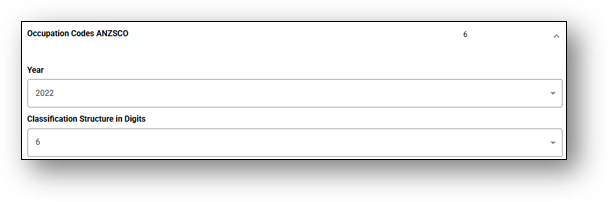
(M) – Industry Codes (ANZSIC)
(N) – Credit Bureau Selection
This integration connects the Nimo platform with one or more credit bureau providers, enabling the retrieval of an applicant’s credit history, credit score, and key risk indicators. It supports both automated decisioning and manual review processes by delivering real-time insights into the applicant’s financial behaviour, including past loan performance, repayment history, defaults, and credit enquiries. Businesses can configure which bureau(s) to use based on their policies or customer profiles and can even compare data across multiple sources if needed. This integration plays a vital role in assessing creditworthiness, reducing default risk, and ensuring lending decisions are backed by reliable, third-party data.
(O) – PPSR Integration
Nimo Assessments now supports an integrated PPSR (Personal Property Securities Register) search workflow. Lenders can perform PPSR checks directly within Nimo for vehicles linked to loan applications. With simple configuration in the assessment pipeline and valid PPSR account credentials, results can be retrieved and assessed in real time against predefined rules.
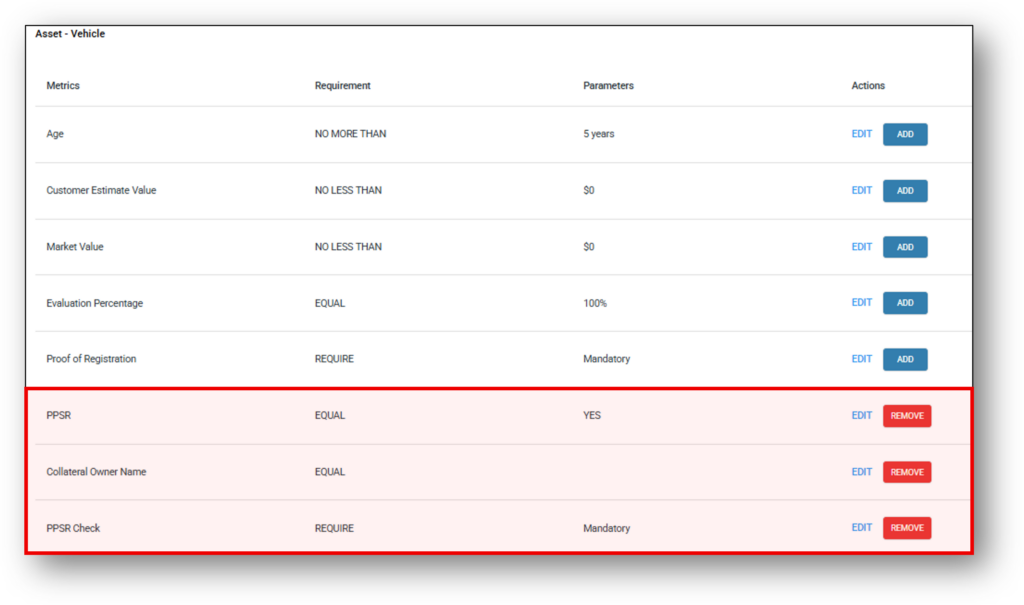
To set up assessment rules for PPSR:
- Navigate to Risk > Assessment > Asset Position > Asset – Vehicle
- PPSR: Responsible for determining if a successful PPSR search has taken place
- Collateral Owner Name: Checks if Applicant name = PPSR Collateral owner name
- PPSR Check: Displays information returned from the PPSR Search
Risk > Assessment rule view:
(P) – DocuSign
TBC
(Q) – Vendor Verification
TBC
(R) – Payments: Direct Debit
This integration enables the Nimo platform to facilitate automated loan repayment plans through secure direct debit arrangements. Customers can easily authorize recurring payments from their nominated bank accounts, allowing for seamless and reliable loan servicing without manual intervention. The API manages the entire setup process, including account verification, mandate authorization, and ongoing billing in full compliance with banking standards and regulations. By automating repayments, the integration reduces administrative overhead, minimizes the risk of late or missed payments, and improves cash flow certainty for lenders. Additionally, Nimo’s platform provides real-time tracking of payment statuses, enabling proactive management of failed transactions and enhancing the overall borrower experience through transparent and convenient payment processes.
(S) – Payments: Disbursements
TBC
(T) – Payments: Pay Anyone
TBC
(U) – Payments: Company Verification
TBC
(V) – Exchange Verification Provider
This integration provides a critical layer of security by validating bank account details before any financial transactions such as disbursements, direct debits, or refunds are processed through the Nimo platform. It confirms that the bank account belongs to the intended customer, verifying account ownership and authenticity using trusted verification services and real-time banking data. By ensuring accurate matching of account information, this step helps prevent fraud, misdirected payments, and operational errors. Incorporating exchange verification within the loan lifecycle enhances trust and compliance while safeguarding both lenders and borrowers from financial loss and administrative complications. The Nimo platform leverages this automated verification to streamline payment accuracy, reduce manual checks, and maintain a secure, efficient disbursement process.
(W) – MuleSoft
This integration leverages MuleSoft as a powerful data orchestration and integration platform, enabling banks to seamlessly connect the Nimo platform with a wide range of existing back-office systems such as core banking, loan servicing, customer relationship management (CRM), and more. By utilizing MuleSoft’s extensive library of pre-built connectors and integration templates, financial institutions can reduce the complexity and cost associated with developing bespoke APIs for each system. This orchestration layer facilitates smooth data flows, real-time synchronization, and unified process automation across disparate platforms. The result is faster implementation, improved data consistency, and enhanced operational efficiency within the loan lifecycle. Integrating MuleSoft with Nimo helps banks streamline their technology stack, improve scalability, and maintain agility in responding to evolving business needs and regulatory requirements.
(X) – Select Aggregator
No longer used
(Y) – Marketing CRM
This integration connects the Nimo platform with customer relationship management (CRM) systems to ensure seamless synchronization of borrower data throughout the loan application lifecycle. It enables automatic updating and tracking of leads, contacts, and application statuses within the CRM, providing sales and service teams with up-to-date information in real time. By pushing key events, such as application submissions, status changes, and approval outcomes, into the CRM, the platform helps maintain a unified view of customer interactions and pipeline progression. This connectivity enhances collaboration between front-office teams and lending operations, improves lead nurturing and follow-up efficiency, and supports data-driven decision-making. Ultimately, the integration strengthens customer engagement and drives operational transparency by bridging loan processing workflows with customer management tools.
More to put in according to Peter – Complex setup
(Z) – Broker CRM
(1) – ABN Lookup
This integration enables the Nimo platform to perform real-time validation of Australian Business Numbers (ABNs) by querying official public business registers. It verifies the existence, registration status, and key details of business entities such as sole traders, partnerships, and companies applying for loans. By automating this verification step, lenders can confidently confirm the legitimacy of business applicants, reduce fraud risk, and ensure compliance with regulatory requirements. The API also provides additional business information, such as trading names and entity types, that can be used to streamline application processing and tailor loan products to specific business profiles. This real-time, authoritative validation supports faster decision-making and improves data accuracy within the lending workflow.
(2) – Webhooks
TBC