Nimo Glossary
A quick explanation of the Nimo specific terms
Core Banking – Nimo’s Core Banking is made up of 3 distinct layers designed to manage the entire corporate and commercial portfolio on a single, integrated platform. Core Banking includes Nimo’s Servicing, Credit Control & Internet Banking portal for customers.
Forms – Nimo forms are the result of placing specific ‘Modules‘ together to create a Customer Form. The Customer form in turn, provides the customer with the ability to apply for a product through the organisations website online (usually linked to an “Apply Now” style button).
Form Builder – Form Builder is the administrative section of Nimo that allows users to modify, update and create new customer forms fit for purpose.
KYC – Know Your Customer (KYC) is part of Nimo’s Assessment Pipeline rulesets that is checked through credit Bureaus. These rulesets are then addressed as per your company’s credit policy. The KYC checks include; Politically Exposed Persons (PEP’s), Sanctions, Financial Regulator, Law Enforcement agencies, Disqualified Directors, Insolvency, Adverse Media, KYC Profiles and other KYC related checks.
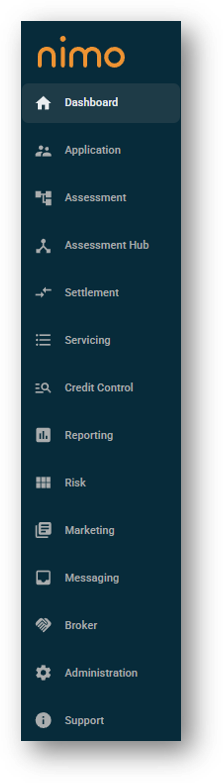
Layer – Each clickable section on Nimo’s left-hand side is considered a layer (E.g. Dashboard Layer, Application Layer etc.). Each user may have differently configured views depending on your role within your organisation. Initially Nimo will be set up out-of-the-box for each user, then, the Superuser will manage on-going access per users when required. The different layers available are featured below:
Modules – Modules are the individual stages or steps that make up a data collection form (customer form) in Nimo. Modules are specifically designed and fit for purpose. For example, a Customer Details module is the section of a form designed to collect the customers details such as; name, address, phone numbers etc. by contrast the ‘Purpose Personal Loan’ module is designed to collect details from the applicant regarding; the reason they want a loan, how much they are looking to borrow, the date they need the loan by.
Originations (Loan Originations or LO) – Originations refers to the three layers within Nimo that relate to the lifecycle of a loan:
-
- Application Layer – Once a customer completes an application for new lending through the online customer form via your organisations website, the application flows through to this layer awaiting to be actioned by your staff.
- Assessment Layer – After the details are completely captured as per your companies requirements, the application can be progressed through to the Assessment stage of the process. During this stage the loan application will be assessed as per your organisations credit policy rules.
- Settlement Layer – The final stage of the Loan Origination lifecycle. If the application is approved it will move to the Settlement stage ready for the final processes to be completed prior to disbursing the funds into the customer’s account.
Specialty Functions – These are the features and functions of Nimo that generally require Superuser management and access. They will include important controls, such as creating customer forms, setting up automations, customer communications. At a high-level they will include the following layers:
-
- Risk
- Marketing
- Administration
Tab (tabs) – Each of Nimo’s layers (the left-hand side menu), is defined by a top of the page ‘Tab’ menu, that allows quick and easy navigation between sections within each layer. Below is an example of the ‘Tabs’ menu with the Application layer:
