Risk – Assessment Pipeline
When setting up a new Assessment Pipeline, refer to the below accordions as your reference guide to the ruleset categories, sub-categories, individual rules and formulas.
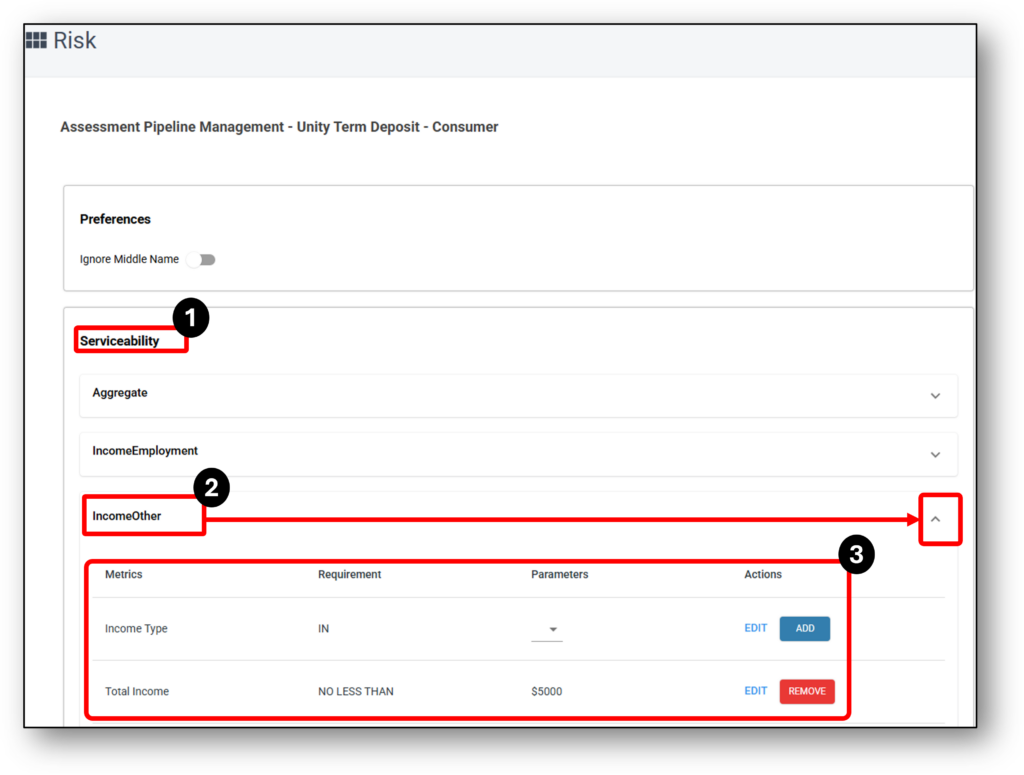
Assessment Pipeline Breakdown
- Category – this is the top level of the pipeline. E.g. ‘Serviceability’
- Sub-Category – All of the categories of information that sit within the main category. E.g. ‘Income Other’ or ‘Aggregate’ (that sits within the ‘Serviceability‘ category)
- Assessment Rule – All of the associated rules that are applied under each of the sub-categories. E.g ‘Total Income is No Less Than $5000‘ (that sits within the sub-category of ‘Income Other’)
Nimo has hundreds of rules available in the system. Refer to the below ‘category‘ accordions for a complete list of their ‘sub-categories‘, ‘assessment rules‘, and further descriptions and formulas used.

Serviceability
Aggregate
All formulas are calculated in annual format and are subsequently presented on a monthly or annual basis. The locations of the values are listed next to the title of each category.
- Total Gross Income – (serviceability)
- Applicant 1 combined gross income + Applicant 2 combined gross income
- Total Net Income – (serviceability)
- Applicant 2 combined net income + Applicant 2 combined net income
- Total Expenses (serviceability)
- The total of all adjusted or non-adjusted expenses value including living expenses and rental expense.
- NIS (Net Income Surplus) (serviceability)
- Formula – Total Net Income – Total Expenses
This provides you with the net surplus after accounting for all buffers and shading. - DSR (excl. Liv exp) (Debt to Service Ratio – excluding living expenses) (serviceability)
- Formula – Total Debt Expenses / (Total Gross Income + Non Taxable Income × 12)
- DSR (incl. Liv exp) (Debt to Service Ratio – including living expenses) (serviceability)
- Formula – Total Expenses / (Total Gross Income + Non Taxable Income × 12)
- DSR (Net – excl. Liv exp) (Debt to Service Ratio – excluding living expenses) (serviceability)
- Formula – Total Debt Expenses / (Total Net Income + Non Taxable Income × 12)
- DSR (Net – incl. Liv exp) (Debt to Service Ratio – including living expenses) (serviceability)
- Formula – Total Expenses / (Total Net Income + Non Taxable Income × 12)
- LTI (Gross Income) Loan to Income (serviceability)
- Formula – Loan amount incl. fees / (Total Gross Income + Non Taxable Income × 12)
- LTI (exposure) Loan to Income (serviceability)
- Formula – Loan amount incl. fees + All existing (your company) liabilities / (Total Gross Income + Non Taxable Income × 12)
- DTI (Gross Income) Total Debt to Income (serviceability)
- Formula – Total Debts / (Total Gross Income + Non Taxable Income × 12)
- NIS Ratio (Net Income Surplus Surplus) (serviceability)
- Formula – (Total Net Income – Living Expense) / (Repayments + Rent)
- Total Net Income (NG PR) (serviceability)
- Formula – Use net income which uses Adjusted Tax using Product Rate
- Total Net Income (NG ER) (serviceability)
- Formula – Use net income which uses Adjusted Tax using Existing Rate
- NIS (NG PR) (serviceability)
- Formula – Total Net Income (NG) (negative gearing using product rate) income – Total expenses
- NIS (NG ER) (serviceability)
- Formula – Total Net Income (NG) (negative gearing using existing investment rate) income – Total expenses
- DSR NG ER (Net – excl. Liv exp) (serviceability)
- Formula – Total Debt Expenses / (Total Net Income (NG ER) + Non Taxable Income × 12)
- DSR NG ER (Net – incl. Liv exp) (serviceability)
- Formula – Total Expenses / (Total Net Income (NG ER) + Non Taxable Income × 12)
- NIS Ratio NG ER (serviceability)
- Formula – (Total Net Income (NG ER) – Living Expense) / (Repayments + Rent)
- NDI Ratio (serviceability)
- Formula – (Total Net Income – Living Expense) / (Repayments + Rent)
- LTI (Non-weighted) (serviceability)
- This rule does not apply the income other weightings
Formula – Loan amount incl. fees / (Total Gross Income + Non Taxable Income × 12) - DTI (Non-weighted) (serviceability)
- This rule does not apply the income other weightings
Formula – Total Debts / (Total Gross Income + Non Taxable Income × 12)
Asset Position
- Total Debts (asset position)
- The total of all debts adjusted or non-adjusted values.
(credit card and store card use the limit)
Income Employment
This section outlines the assessment rules for the applicant’s income position, including the assigned weighting for each type of income.
To facilitate proper functioning of this section, the following ‘Mandatory‘ rules need to be enabled, whilst others are ‘Optional’.
| Mandatory Rules: | Optional Rules: |
| Base Gross Income | Total Gross Income Verified |
| Base Net Income | Payslips |
| Additional Gross Income | Job Type |
| Additional Net Income | Job Basis |
| Additional % | Latest Job Commencement |
| Additional % Gross Income | |
| Additional % Net Income |
Rules:
Job Type – (serviceability) – Allows to select what type of income is allowable – PAYG, Self Employed etc.
Job Basis – (serviceability) – Allows to select what type of employment status is allowable – Full Time, Part Time, Contract, Casual
Latest Job Commencement – Compares the employment start date and the current date
Base Gross Income – Uses the most current ATO tax brackets to display the gross value.
Base Net Income – Uses the most current ATO tax brackets to display the net value.
Additional Gross Income & Additional Net Income – Bonuses, commissions, overtime, etc. are added to the PAYG gross income when a value is entered in this field. The system then calculates the difference between the PAYG gross income and the additional income, displaying gross and net results.
Example (annual):
-
-
- $100,000 PAYG gross income
- $10,000 Additional gross income
- $110,000 Total gross income
- $100,000 = $75,033 PAYG net income
- $110,000 inc addiontal income = $81,583 PAYG net income
- $81,583 – $75,033 = $6,550 PAYG net income
- $10,000 Additional gross income
- $6,550 PAYG net income
-
Additional % – Include this rule if you want to apply shading to the additional income
Example:
-
-
- $10,000 additional income
- Additional % = 80%
- $8,000 is used
-
Additional % Gross Income – Include this rule if you want to add a parameter to the Additional % to flag a referral when the resulting value is above, below, or equal to a certain threshold
Example:
-
-
- Value Result $8,000
- Parameter = No Less Than $9,000
- Outcome = ‘Refer’ due to the result of $8,000 is less than $9,000
-
Total Gross Income Verified – Including this rule will require a staff member to verify the gross income provided manually entering the monthly or annual income. (depends on the timeframe chosen)
Note: The Total Gross Income Verified entry will override the customer entered value.
Total Net Income from Bank Statement – Net income verified directly from bank statements.
Superannuation – This rule is predominantly used for SMSF loans. If enabled, it will calculate the PAYG based on the percentage selected, and this value will supersede the PAYG gross income as the primary value. This is used to calculate super contributions
Equifax Verification Exchange Rules – (Only add if you are using Equifax Verification Exchange) – The below specified rules will exclusively appear in the ‘Serviceability > Income Employment’ section upon clicking the ‘Evaluate’ button, situated beneath each applicant’s income, and labeled as ‘Verification Exchange Total.’ This visibility is contingent on the successful completion of the Verification Exchange, with the information status reflecting as ‘Completed.’ If not successful, then the status will indicate ‘No Record Found.’
- VE Gross Income Verified – Verified evidence of gross income from primary employment.
- Gross % – Percentage of total income represented by gross income.
- Gross % Income Verified – Confirmed percentage of gross income after verification.
- Bonus & Commission Verified – Verified bonus or commission income.
- Bonus & Commission % – Percentage of total income made up of bonus or commission.
- Bonus & Commission % Income Verified – Proportion of income from verified bonus or commission.
- OverTime Verified – Verified overtime income.
- OverTime % – Percentage of total income earned through overtime.
- OverTime % Income Verified – Proportion of income from verified overtime.
- Allowance Verified – Verified allowance income (e.g., travel, housing, car).
- Allowance % – Percentage of total income from allowances.
- Allowance % Income Verified – Proportion of verified allowance income.
- Foreign Employment Payment Verified – Confirmed foreign income earned from overseas employment.
- Foreign Employment Payment % – Share of income from foreign employment.
- Foreign Employment Payment % Income Verified – Proportion of verified foreign income.
- Exempt Foreign Income Verified – Verified foreign income that is exempt from Australian tax.
- Exempt Foreign % – Share of exempt foreign income in total income.
- Exempt Foreign % Income Verified – Proportion of verified exempt foreign income.
- Voluntary Agreement Verified – Confirmed income from voluntary employment agreements (e.g., contractor under ATO voluntary withholding).
- Voluntary Agreement % – Percentage of income from voluntary agreements.
- Voluntary Agreement % Income Verified – Proportion of verified voluntary agreement income.
- Labour Hire Payments Verified – Verified payments received through labour hire arrangements.
- Labour Hire Payments % – Percentage of total income from labour hire work.
- Labour Hire Payments % Income Verified – Proportion of verified labour hire income.
- Cdep Amount Verified – Verified Community Development Employment Program (CDEP) payments.
- Cdep Amount % – Share of income from CDEP.
- Cdep Amount % Income Verified – Proportion of verified CDEP income.
- Director Fees Verified – Verified director’s fee income.
- Director Fees % – Percentage of total income from director fees.
- Director Fees % Income Verified – Proportion of verified director fee income.
- Other Specified Payments Verified – Verified income from other specified sources not captured above.
- Other Specified Payments % – Percentage of total income from these payments.
- Other Specified Payments % Income Verified – Proportion of verified income from other specified payments.
Document Rules:
The inclusion of the following rules mandates that the applicant must provide documents, such as:
Payslips – Official payroll documents used to verify income.
Income Bank Statement – Bank transaction records used to confirm income deposits.
2 Years Financials (Business) – Financial statements covering the past two years.
2 Years Tax Returns (Business) – Business tax returns submitted for the last two years.
2 Years Tax Returns (Individual) – Personal tax returns submitted for the last two years.
Income Other
Income type offers the choice to select and input shading/weighting for other types of income outside the primary category. When you click the ‘Edit’ button next to income type, a pop-up will appear, allowing you to select other allowable types of income and specify their shading or weighting. For example, if you input 80%, the system will utilise 80% of the income value.
Tip: Once you have chosen the income types, ensure that you also update the application form in the form builder under the “Income Other” module > “Type of Other Income”.
To facilitate proper functioning of this section, the following ‘Mandatory‘ rules need to be enabled, whilst others are ‘Optional’.
| Mandatory Rules: |
| Income Type (+ All options have been selected, and weightings have been applied as described above) |
| Total Income |
| Additional % |
| Additional % Other Income |
Rules:
Total Income – The applicant’s overall income, combining base, additional, and verified income sources.
Additional % – Percentage contribution of additional income compared to total income.
Additional % Other Income –Share of income from other (non-primary) sources, expressed as a percentage of total income.
Income Bank Statement –Verified income based on deposits shown in the applicant’s bank statements.
Income Type – Specifies the category of income (e.g., Investment, pension, rental income). Income Other Types are either Gross or Net income:
| Gross | Net |
| Interest income | Property Rental (Net) |
| Investment | Pension |
| Property Rental | Family Allowance |
| Foreign Sourced | Superannuation |
| Work Allowance | Child Support |
| Workers Compensation | Carers Payment |
| Rental Assistance | Family Allowance Tax A & B |
| Site Allowance | Disability Income |
| Maternity Leave Income | Salary Continuance Insurance |
| Other (Gross) | Other (Net) |
| Short Term Rentals | Short Term Rentals (Net) |
| Government Benefit | |
| Parental Payment (Gross) |
Living Expenses
-
Verified Expense Percentage – The portion of the applicant’s declared expenses that have been verified and assessed for accuracy.
-
Percentage Increase Allowed – The maximum allowable increase in expenses or liabilities compared to a baseline or historical value.
-
Groceries – Amount spent on food and household consumables.
-
Insurance – Monthly payments for any insurance policies, including health, life, home, or vehicle insurance.
-
Rent – Monthly rent or lease payments for housing.
-
Subscription TV – Expenses on paid television or streaming services.
-
Telecommunications – Spending on phone, internet, and other communication services.
-
Utilities – Monthly payments for electricity, gas, water, and other essential services.
-
Education & Childcare – Expenses related to schooling, childcare, or educational programs.
-
Personal Care – Spending on hygiene, grooming, and personal maintenance.
-
Department Stores – Purchases made at general retail or department stores.
-
Health – Expenditure on medical services, prescriptions, or health-related products.
-
Travel – Costs associated with vacations, flights, accommodation, or other travel-related expenses.
-
Home Improvement – Spending on renovations, repairs, or upgrades to the home.
-
Entertainment – Expenses for movies, events, hobbies, and other leisure activities.
-
Dining Out – Spending at restaurants, cafes, or takeaway services.
-
Pet Care – Costs for pets, including food, grooming, and veterinary services.
-
Gyms & other memberships – Payments for gyms, clubs, or subscription-based memberships.
-
Retail – Spending at non-specific retail outlets excluding department stores.
-
Vehicles and Transport – Costs for car loans, fuel, public transport, and vehicle maintenance.
-
Uncategorised Debits – Transactions that do not fit into predefined categories and require review.
Living expenses are either digitally retrieved and populated by your selected integration or completed manually at the application layer, subsequently populating the assessment layer.
Parameters consist of 100% values to display the full value of the living expenses retrieved or entered.
All rules require to allow for the summation of all values. If a value for the living expense category is not selected, the total living expense value will not populate, and the living expense section will instead use the HEM value
During the loan application process, NIMO obtains the customer’s transactional data from their internet banking and verifies it against what they declared will happen after settlement. If the customer indicates that a cost will decrease or disappear after loan settlement, the Assessment pipeline rule will compare it to the data retrieved from their internet banking.
The Assessment rule displays that the rent must not be “Less than” 100% of the data retrieved from the internet banking, or else the loan application will be referred to the Credit Management team for further evaluation.
For instance, the figure below demonstrates a scenario where the customer’s rent has been retrieved from their internet banking at $183.58 per month. However, the customer selected “Yes” and entered a new value of $0, indicating that they no longer need to pay rent because they have purchased a new property however this will refer due to the rule being anything Less than 100% of the initial value ($183.58) will refer to the credit team to review.
Loan Expense - BNPL
-
Repayment Amount – The scheduled repayment amount the applicant must pay for a specific loan or liability.
-
Liability Amount – The total outstanding balance of a particular liability or debt held by the applicant.
-
Liability Limit – The maximum allowable exposure or credit limit for a specific liability type.
-
Liability Limit % –
-
Adjusted Repayment – The recalculated repayment amount after factoring in changes like repayment holidays, overpayments, or interest adjustments.
-
Bank Statements of Loan – Documents showing the loan transactions and balances, used to verify repayment history and assess risk.
Loan Expense - Home Loan
To facilitate proper functioning of this section, the following ‘Mandatory‘ rules need to be enabled, whilst others are ‘Optional’.
| Mandatory Rules: | Optional Rules: |
| Repayment Amount | Evaluation Percentage |
| Liability Amount | |
| Repayment Amount with Buffer | |
| Repayment Amount with Interest Floor |
Rules
Repayment Amount – Displays the current repayments obtained either through bank statements or manual entry.
Liability Amount – Current outstanding balance on the loan
Liability Limit – The maximum allowable exposure or credit limit for a specific liability type.
Liability Amount excl. fees – The total liability balance excluding any fees, charges, or penalties.
Evaluation Percentage – This rule will apply a percentage weighting to the repayment amount (The Evaluation Percentage is typically utilised for personal loans but can also be applied to home loans).
Repayment Amount with Buffer – This will apply a buffer to the initial loan interest rate:
Example:
-
- If a 3.00% buffer is entered:
- Current interest rate: 4.00% + 3.00% buffer = 7.00%
- The repayment amount will be calculated at 7.00%
Repayment Amount with Reverting Buffer – The repayment amount with a buffer that can adjust or revert based on future financial conditions.
Repayment Amount with Interest Floor – This will calculate the repayments based on a provided fixed value. The assessment layer will use the higher of repayments between the buffered rate and floor rate for calcuations.
Bank Statements of Loan – Documents showing the loan transactions and balances, used to verify repayment history and assess risk.
Loan Expense Other
To facilitate proper functioning of this section, the following ‘Mandatory‘ rules need to be enabled, whilst others are ‘Optional’.
| Mandatory Rules: | Optional Rules: |
| Repayment Amount | Bank Statements of Loan |
| Liability Amount | |
| Evaluation Percentage |
Mandatory Rules
Repayment Amount
Liability Amount
Evaluation Percentage
Optional Rules
Bank Statements of Loan
(The Evaluation Percentage is typically utilised for personal loans but can also be applied to home loans.)
Rules
Repayment Amount – Displays the current repayments obtained either through bank statements or manual entry (The Evaluation Percentage is typically utilised for personal loans but can also be applied to home loans).
Liability Amount – Current outstanding balance on the loan.
Liability Limit – The maximum allowable exposure or credit limit for a particular liability type.
Evaluation Percentage – This rule will apply a percentage weighting to the repayment amount.
Bank Statements of Loan – Documents showing the loan transactions and balances, used to verify repayment history and assess risk.
Loan Expenses - Personal Loan
Store & Credit Card Expense
Timeframe Preferences
Line of Credit Expenses
-
Repayment Amount
The scheduled repayment amount an applicant must pay for a liability (e.g., loan or credit card). -
Liability Amount
The outstanding balance on a liability at the time of application. -
Liability Limit
The maximum credit or loan limit assigned to the liability (e.g., credit card limit). -
Liability Limit %
The proportion of the liability’s limit currently being used or assessed against income. -
Liability % Dynamic
-
Adjusted Repayment
A recalculated repayment figure after applying lender rules. -
Bank Statements of Loan
Supporting documents verifying liability details (e.g., repayment history, balances) from the applicant’s bank account
Asset Position
Aggregate
Rules:
Net Assets – The total value of an applicant’s assets minus their liabilities.
Net Assets – Security – Net assets specifically tied to the secured property or collateral.
Combined Assets Amount – The total sum of all assets held by the applicant(s).
Combined Liabilities Amount – The total sum of all liabilities owed by the applicant(s).
Security Property Value – The assessed value of the property being used as collateral for the loan.
Other Assets Amount – Value of additional assets not included in the primary security property.
Asset / Liability Ratio – The ratio of total assets to total liabilities, used to evaluate financial stability.
LVR (discounted 5%) – Loan-to-Value Ratio with a 5% discount applied, indicating the proportion of the loan relative to the property’s value.
Asset - Deposit Fund
Rules:
Customer Estimate Value – The asset value estimated by the customer.
Verified Deposit Value – The deposit amount verified by the bank or lender.
Institution – The financial institution holding the deposit or account.
BSB – Bank-State-Branch number identifying the financial institution and branch.
Account Number – The account number where the deposit is held.
Evaluation Percentage – The percentage used to assess or validate the value of the deposit against lending criteria.
Asset - Home Content
Rules:
Customer Estimate Value – The asset value estimated by the customer.
Market Value – The current estimated value of the asset or property in the open market.
Evaluation Percentage – The percentage applied to the market value to assess its contribution toward the loan.
Proof of Asset – Documentation provided to verify ownership or existence of the asset (e.g., title deeds, statements).
Asset - Other
Rules:
Customer Estimate Value – The asset value estimated by the customer.
Market Value – The current estimated value of the asset or property in the open market.
Evaluation Percentage – The percentage applied to the market value to assess its contribution toward the loan.
Proof of Asset – Documentation provided to verify ownership or existence of the asset (e.g., title deeds, statements).
Asset - Property
Rules:
Is Primary Property – Indicates whether this property is the applicant’s main residence.
Property Size (in square meters) – The total built-up area of the property. This would apply to apartments/units.
Land Area (in square meters) – The total land size of the property land area (farms etc.)
Accepted Property Type – Acceptable company credit policy security types allowable.
Accepted Purpose – The purpose of what the loan is being used for to be acceptable as per company credit policy.
LVR (Loan-to-Value Ratio) – Total loan amount / total valuations of all securities.
Combined LVR – LVR calculated considering all loans secured by the property.
Customer Estimate Value – The applicant’s estimated value of the property.
Market Value – Value obtained via valuation completed by valuer.
High Risk Postcode – Post codes the company credit policy does not wish to lend too.
High Density Postcode – Normally refers to apartments or strata titles with many complexes.
Property Type Match – Whether the actual property type matches the accepted type for lending.
Property Valuation – Displays if the property has been valued.
Property Valuation (discounted) – A conservative valuation applying a discount factor to account for risk.
FSD Confidence – The lower the FSD, the better quality/accuracy of the AVM. This percentage is sometimes turned into a confidence score by subtracting it from 100 percent (e.g., an FSD of 0.07 or 7 percent is a confidence score of 93 percent).
Proof of Valuation – Documentation verifying the property valuation.
Land Title – Official title document for the property.
Land Title Encumbrances – Displays the number of interests against the property (e.g., a bank has an Encumbrances/interest against a property listed on the title of the property as they have provided the customer a loan. (If a homeowner doesn’t keep up with mortgage payments, the lender has the right to foreclose on the property)
Land Title Name – Name on the title (normally confirms the property owner ownership)
Land Title Type – Torrens (most common), Strata title, Leasehold, Company
Land Title Tenancy – Tenancy in common is a popular type of property ownership that means two or more people co-own property in defined shares. The shares owned in a tenancy in common can be equal or unequal. For example, you can own 99% of the shares, and your co-owner can own 1%
Proof of Land Title – Documentation confirming legal ownership of the property.
Asset - Share
Rules:
Customer Estimate Value – the value of the stock portfolio the customer perceives it to be
Market Value – current value of the stock portfolio as per the current market trading value.
Evaluation Percentage – percentage of home contents allowable to use towards the asset position.
Share Certificate – evidence of the stock portfolio.
Asset - Superannuation
Rules:
Superannuation Fund Value – Funds currently within the superannuation account.
Proof of Asset – evidence via statement.
Evaluation Percentage – percentage of home contents allowable to use towards the asset position.
Asset - Vehicle
Rules:
Age – Age of the vehicle
Customer Estimate Value – Customer declared perceived value of the vehicle.
Market Value – Actual value of the car on the market
Evaluation Percentage – Percentage of home contents allowable to use towards the asset position.
Proof of Registration – Registration certificate
Liability – BNPL
Rules:
Liability Amount – The total outstanding balance of a particular liability or debt held by the applicant.
Liability Limit – The maximum allowable exposure or credit limit for a specific liability type.
Statements of Liability – Documentation outlining all liabilities (loans, debts) held by the applicant.
Liability – Business Loan
Rules:
Liability Amount – The total outstanding balance of a particular liability or debt held by the applicant.
Liability – Credit Card
Rules:
Liability Amount – Amount outstanding and owing on the credit card.
Liability Limit – The maximum allowable exposure or credit limit for a specific liability type.
Bank Statements of Credit Card – Evidence to confirm actual credit card debt.
Liability – Home Loan
Rules:
Liability Amount – Amount outstanding and owing on the home loan.
Liability Limit – The maximum allowable exposure or credit limit for a specific liability type.
Liability Amount excl. Fees – Total outstanding liability excluding any associated fees or charges.
Bank Statements of Loan – Evidence to confirm actual home loan debt.
Liability – Other
Rules:
Liability Amount – Amount outstanding and owing of a particular liability or debt held by the applicant.
Liability Limit – The maximum allowable exposure or credit limit for a specific liability type.
Statements of Liability – Documentation outlining any other liabilities held by the applicant.
Liability – Personal loan
Rules:
Liability Amount – The total outstanding balance of a personal loan held by the applicant.
Liability Limit – The maximum allowable exposure or credit limit for a specific liability type.
Bank Statements of Loan – Evidence to confirm actual personal loan debt.
Liability – Store Card
Rules:
Liability Amount – The total outstanding balance of a store card held by the applicant.
Liability Limit – The maximum allowable exposure or credit limit for a specific liability type.
Statements of Store Card – Evidence to confirm actual store card debt.
Character
Basics
Rules:
Age Lower Limit – The minimum age an applicant must meet to be eligible for the loan.
Age Upper Limit – The maximum age allowed for an applicant at the time of application or at loan maturity.
Total Number of Buy Now/Pay Later – Maximum of allowable the combined amounts for all defaults for customer to meet as per company credit policy.
Residency Status – Indicates whether the applicant is a citizen, permanent resident, or temporary resident, which impacts eligibility.
Tax Identification Number – A unique number (TFN in Australia) used to verify the applicant’s tax and financial identity.
Bureau Check
Rules:
Credit Bureau Check Report – A report from a credit bureau detailing an applicant’s credit history, accounts, and repayment behaviour.
Credit Bureau Check Score – A numerical score generated by the bureau that reflects the applicant’s creditworthiness.
Age of Credit File (days) – How old the credit check can be, to be allowable to be used.
Number of Credit Enquiries – Maximum of allowable Credit Enquiries for customer to meet as per company credit policy.
Number of Defaults – Maximum of allowable Number of Defaults for customer to meet as per company credit policy.
Total Amount of Defaults – The combined dollar value of all defaulted debts.
Number of Credit Exposure Accounts – Maximum of allowable accounts that can have defaults on.
Total Amount of Credit Exposure Accounts – Maximum of allowable the combined amounts for all defaults on an account for customer to meet as per company credit policy.
Number of Court Actions – The maximum of allowable Court Actions customer can have to meet as per company credit policy.
Number of Personal Insolvencies – Maximum of allowable Personal Insolvencies customer can have to meet as per company credit policy.
Number of Directorships – Maximum of allowable Directorships customer can have to meet as per company credit policy.
Bureau Check - Equifax
Rules:
Credit Bureau Check Report – A report from a credit bureau detailing an applicant’s credit history, accounts, and repayment behaviour.
Credit Bureau Check Score – A numerical score generated by the bureau that reflects the applicant’s creditworthiness.
Age of Credit File (days) – How old the credit check can be, to be allowable to be used.
Number of Credit Enquiries – Maximum of allowable Credit Enquiries for customer to meet as per company credit policy.
Number of Defaults – Maximum of allowable Number of Defaults for customer to meet as per company credit policy.
Total Amount of Defaults – The combined dollar value of all defaulted debts.
Number of Court Actions – The maximum of allowable Court Actions customer can have to meet as per company credit policy.
Number of Personal Insolvencies – Maximum of allowable Personal Insolvencies customers can have to meet as per company credit policy.
Number of External Administrations – Maximum of allowable External Administrations a customer can have to meet as per company credit policy.
Number of Directorships – Maximum of allowable Directorships customers can have to meet as per company credit policy.
Company
Rules:
Type of Company – Specifies the legal structure of the business (e.g., sole trader, partnership, private company, public company).
ABN Status – Indicates whether the Australian Business Number (ABN) is active, cancelled, or inactive.
ABN Activation Date (In Years) – The date the ABN was first issued or activated by the Australian Business Register (ABR) in years.
ABN Activation Date (In Months) – The date the ABN was first issued or activated by the Australian Business Register (ABR) in months.
GST Status – Shows whether the business is registered for Goods and Services Tax (GST).
GST Registration Date (In Years) – The official date the business became registered for GST with the ATO in years.
GST Registration Date (In Months) – The official date the business became registered for GST with the ATO in months.
Registered Business Names – The trading names officially registered to the entity under ASIC or ABR records.
Company Bureau Check - Equifax
Rules:
Credit Bureau Check Report – A detailed record from the credit bureau showing an applicant’s credit history, active accounts, repayment behaviour, and any negative listings.
Age of Credit File (days) – How old the credit check can be, to be allowable to be used.
Adverse Findings – Minimum amount of adverse findings allowable for a customer as per company credit policy.
Credit Bureau Check Score – Minimum score for customers to meet as per company credit policy.
Defaults Amounts – The total score generated against the recorded debts where the applicant has defaulted to make required payments and the default has been officially recorded.
Number of Court Actions – The count of legal proceedings taken against the applicant in relation to unpaid debts or financial disputes.
Number of Defaults – Maximum of allowable Number of Defaults for customers to meet as per company credit policy.
Number of Enquiries – The total number of times credit providers or lenders have accessed the applicant’s credit file to assess eligibility.
Number of Months Since Incorporation – The number of months since the company has undergone incorporation.
Number of Other Defaults – Maximum of allowable Number of Defaults for customers to meet as per company credit policy.
Number of Shareholders – Maximum of allowable Number of shareholders for customers to meet as per company credit policy.
Number of Trade References – Maximum of allowable Number of Trade References for customers to meet as per company credit policy.
Total Amount of General Enquiries – The total number of General Enquiries the applicant has made to their credit file.
List of Directors Identified – The list of directors that have verified their identity through the Australian Bureau Registry Services (ABRS).
Company Bureau Check - Illion
Rules:
Credit Bureau Check Report – A detailed record from the credit bureau showing an applicant’s credit history, active accounts, repayment behaviour, and any negative listings.
Number of Defaults – Maximum of allowable Number of Defaults for customers to meet as per company credit policy.
Number of Enquiries – The total number of times credit providers or lenders have accessed the applicant’s credit file to assess eligibility.
Total Amount of General Enquiries – The total number of General Enquiries the applicant has made to their credit file.
Number of Trade References – Maximum of allowable Number of Trade References for customers to meet as per company credit policy.
Number of Court Actions – The count of legal proceedings taken against the applicant in relation to unpaid debts or financial disputes.
Number of Director Court Actions – The count of legal proceedings taken against the Director of the company in relation to unpaid debts or financial disputes.
Number of Specified Registered Charges – Maximum of allowable Number of Specified Registered Charges for customers to meet as per company credit policy.
List of Directors Identified – The list of directors that have verified their identity through the Australian Bureau Registry Services (ABRS).
Identity
Rules:
Digital ID Check – If the digital ID is completed and passed it provides a status here.
Identity Score –ID confirmed via 100-point ID check.
Passport – This area allows you to assign a points value to the ID.
License – This area allows you to assign a points value to the ID.
Medicare – This area allows you to assign a points value to the ID.
Other – This area allows you to assign a different type of ID and points value to the ID.
Bank Statements Check – Cross references the full name of the customer via bank statement.
Land Title Check – Cross references the full name of the customer via Property Title
Driver Licence Type – This area allows you to specify a particular type of Drivers Licence only.
KYC
Rules:
All the below rules require returning a negative or a positive depending on the company credit policy.
- PEP
- Sanctions
- Financial Regulator
- Law Enforcement
- Disqualified Director
- Insolvency
- Adverse Media
- KYC Profile
Condition
Applicant Age
Rules:
Youngest Borrower Lower Age – The minimum age an applicant must meet to be eligible for the loan.
Youngest Borrower Upper Age – The maximum age allowed for an applicant at the time of application or at loan maturity.
Needs Analysis
Rules:
Requested Loan Amount – The total loan amount the borrower is applying for.
Loan Purpose – The reason the loan is being taken, such as purchase, refinance, or renovate.
Purchase Goal – The specific objective of the purchase, for example, first home, investment, or upgrade.
Primary Feature – The main product feature requested, such as offset or redraw.
Secondary Feature – An additional product feature preferred by the borrower.
Primary Repayment Intention – The main way the borrower plans to repay the loan, such as repayment from superannuation.
Secondary Repayment Intention – An alternative repayment method the borrower may consider.
Refinancing – Indicates whether the loan is being used to replace an existing loan.
Refinancing Years Left – The number of years remaining on the current loan being refinanced.
At Least $500,000 Assets – Confirms if the borrower holds assets valued at $500,000 or more.
Receive Pension or Centrelink – Identifies if the borrower receives government pension or Centrelink benefits.
Receive Pension Loans Scheme – Identifies if the borrower receives income under the Pension Loans Scheme.
Refinancing Amount Outstanding – The outstanding balance on the loan being refinanced.
Responsible Lending Flags
Rules:
Number of Dishonours – Maximum of allowable Dishonours customer can have to meet as per company credit policy.
Gambling Expenditure – Monthly – maximum of allowable dollars for all Gambling Expenditure, for customer to meet as per company credit policy.
Gambling Expenditure % – Monthly – maximum of allowable amount for all Gambling Expenditure, for customer to meet as per company credit policy.
Collection and Consolidation – Monthly – maximum of allowable the amount for all Collection and Consolidation for customer to meet as per company credit policy.
Overdrawn – Monthly – maximum of allowable the amount for all Overdrawn for customer to meet as per company credit policy.
Profit and Loss
Add Backs
Rules:
Estimated Values – The projected amounts added back to income during loan assessment, such as non-recurring expenses or tax-deductible items, to reflect the borrower’s true serviceable income.
Aggregate
Rules:
Net Profit – The total revenue minus all operating expenses, interest, taxes, and other costs. Represents the actual profit of the business.
Net Profit inc Add Backs and New Loan – Net profit adjusted by adding back allowable expenses (e.g., depreciation, one-off costs) and factoring in repayments for the new loan. Used to assess true serviceable income.
Total Income – The sum of all income streams reported by the applicant (e.g., salary, business income, rental income).
Total Expenses – The total outflow of funds, including operating costs, liabilities, and living expenses.
Total Expenses inc Addbacks – The total expenses adjusted for add backs, excluding non-recurring or tax-deductible items, to reflect ongoing obligations.
Net Profit Margin Ratio – A financial ratio showing net profit as a percentage of total income, used to measure profitability and financial stability.
Total Debts & Liabilities –
Total Existing Interest Commitments – The total amount of money that has been contractually agreed upon (committed) to be paid as interest on existing loans, investments, or other financial agreements, set as per company policy.
Total Existing Payment Commitments – The total amount of money that has been contractually agreed upon (committed) to be paid as payments on existing loans, investments, or other financial agreements, set as per company policy.
Total Buffered Interest Commitments – The total amount of money that has been assessed as a required buffer towards committed interest on existing loans, investments, or other financial agreements, set as per company policy.
Total Buffered Payment Commitments – The total amount of money that has been assessed as a required buffer towards committed payments on existing loans, investments, or other financial agreements, set as per company policy.
ICR – The minimum acceptable Interest Coverage Ratio (ICR) percentage, as per company credit policy.
DSCR – The minimum acceptable Debt Service Coverage Ratio (DSCR) percentage, as per company credit policy.
Loan Expenses
Rules:
Repayment Amount – The scheduled repayment that the applicant must make for a liability or loan.
Liability Amount – The total outstanding balance on a loan or debt.
Liability Limit – The maximum approved limit for a liability, such as a credit card or overdraft.
Liability Amount excl. fees – The liability balance excluding any additional charges or fees, showing the pure debt amount.
Evaluation Percentage – The ratio used to assess the liability or repayment against income or policy parameters to determine serviceability.
Repayment Amount with Buffer – The repayment amount recalculated with an added buffer percentage to test the applicant’s ability to handle potential increases.
Repayment Amount with Reverting Buffer – The repayment recalculated assuming the loan reverts to a higher rate (e.g., after a fixed term), plus an additional buffer.
Repayment Amount with Interest Floor – The repayment recalculated using a minimum interest rate (floor rate), regardless of the actual product rate, to test affordability.
Total Expenses
Rules:
Total Expenses – The total outflow of funds, including operating costs, liabilities, and living expenses.
Total Income
Rules:
Total Income – The sum of all income streams reported by the applicant (e.g., salary, business income, rental income).
Balance Sheet
Aggregate
Rules:
Total Net Assets – The value of all assets owned by the business(s) minus all liabilities, showing overall financial position.
Working Capital – The difference between current assets and current liabilities, indicating short-term financial health and liquidity.
Assets - Balance Sheet
Rules:
Total Assets – The combined value of all assets owned by the business, including properties, vehicles, savings, equipmentinvestments, and other declared assets.
Liabilities
Rules:
Total Liabilities– The combined value of all financial obligations owed by the business.