
Credit Control – Delinquency tab
The Delinquency tab focuses on monitoring and handling overdue or past-due accounts.
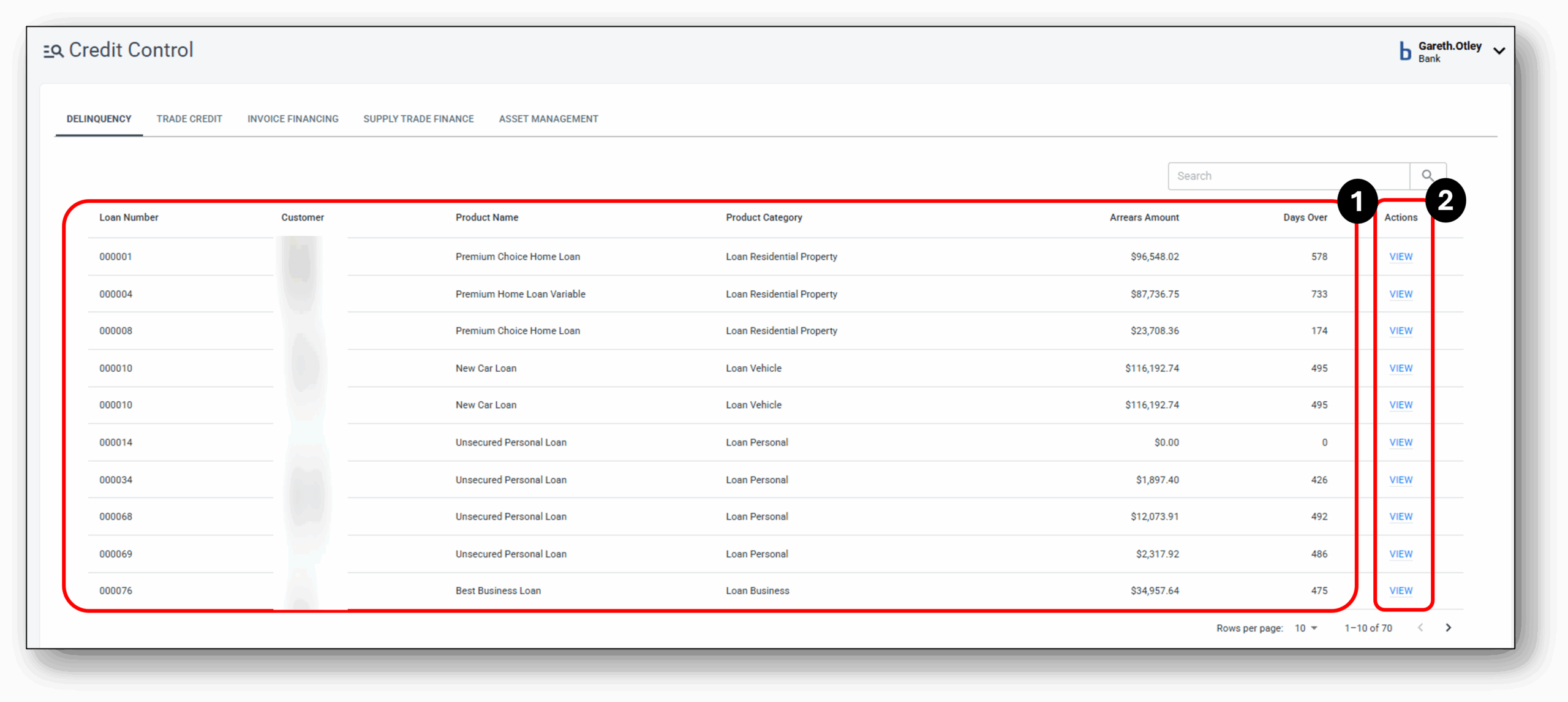

1 - Account Details
The main summary section on the screen provides a list of all the loans that have entered and are currently in a delinquency status. This screen is a gateway to help staff track loans or credit accounts that have missed payments.
The delinquent account will be organised by ‘Loan Numbers’ and will show the customer number, product name & category, the arrears amount in dollars $, as well as the amount in days the account has been sitting in the delinquent state.
Once the user has found the Delinquent account they wish to pull up for management, simply click on the ‘View’ status, which will open the specific account management servicing area.
2 - View/Overview
After selecting and clicking into the account, users will be presented with the following view:
Inside the Account Management Area.
1. At the top left, user can choose from the 3 available tabs – Overview (Currently shown in the image), Case and the Documents tab.
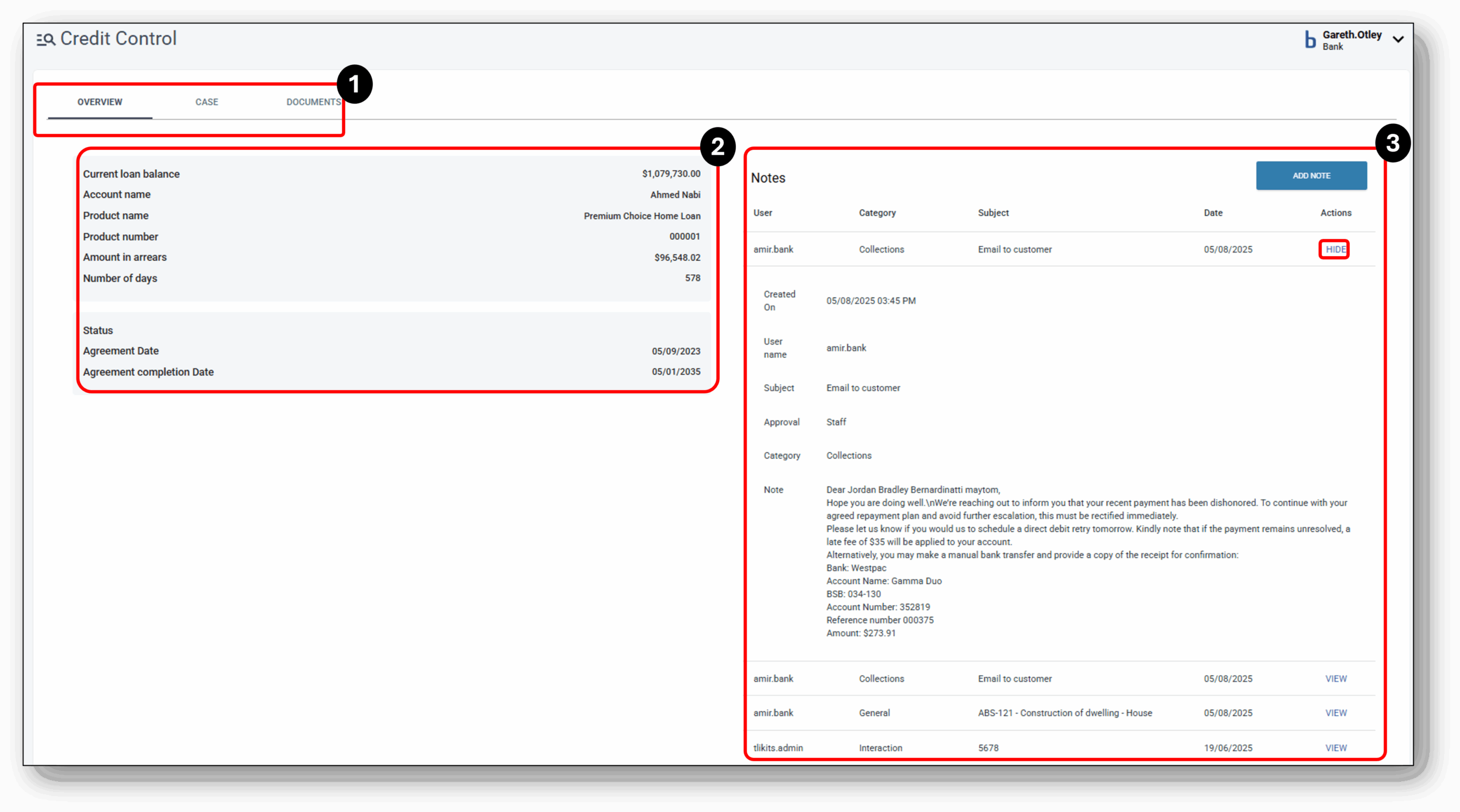
2. Key Account Information on the left hand panel for the staff member:
- Current Loan Balance
- Account Name
- Product Name
- Product Number
- Amount in dollars $ the account is in arrears
- The number of days the account has ben in arrears
- The account status
- Agreement Date of the loan contract
- Agreement Completion date
3. Notes section
Each note is displayed as a short note initally and can be expanded to show the full details. The short notes will only show key information such as:
- User (Staff member that left the note)
- Category (Team/Department of the staff member who created the note, i.e. A staff member from the collections team leaves a note under the ‘Collections’ category. Alternatively, this can be the category that describes the nature of the conversation they had with the customer, i.e. A Customer Servicing team member leaves a note regarding the nature of the conversation they had with the customer. i.e. ‘Collections’ or ‘Hardship’).
- Subject (Succinct purpose of the note, i.e “HRD52022140 – Financial hardship discussion”)
- Date (Timestamp of the note creation)
- VIEW/HIDE (The ability to expeand the note for further detail).
When a note is expanded, an ‘Approval’ row is now visible to show if the action recorded required elevated approval. The full detail of the note will now be visible in the ‘Note’ row.
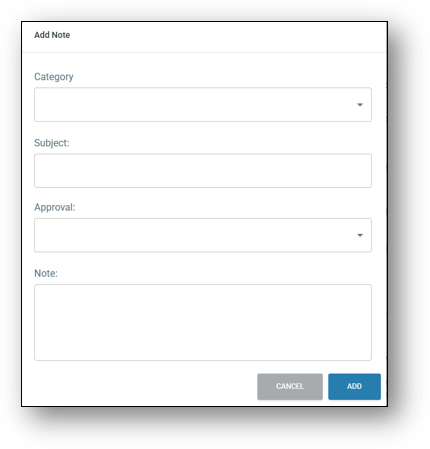
The user can also add a new note in this section here. The note will be visible in other servicing tabs so that other departements and teams have visibility. As expected the user just needs to fill in the same fields as mentioned above. Some information will be automatically captured such as User name, timestamp and the date.
Case Management (delinquent accounts)
Case management of delinquent account involves a structured process to monitor, assess, and resolve overdue customer obligations. Once the user has selected the account/s requiring management, using the ‘Case’ tab provides the user with the capability to implement tailored recovery strategies. These strategies may include payment reminders, negotiation of repayment plans, or escalation to collections or legal action when necessary.
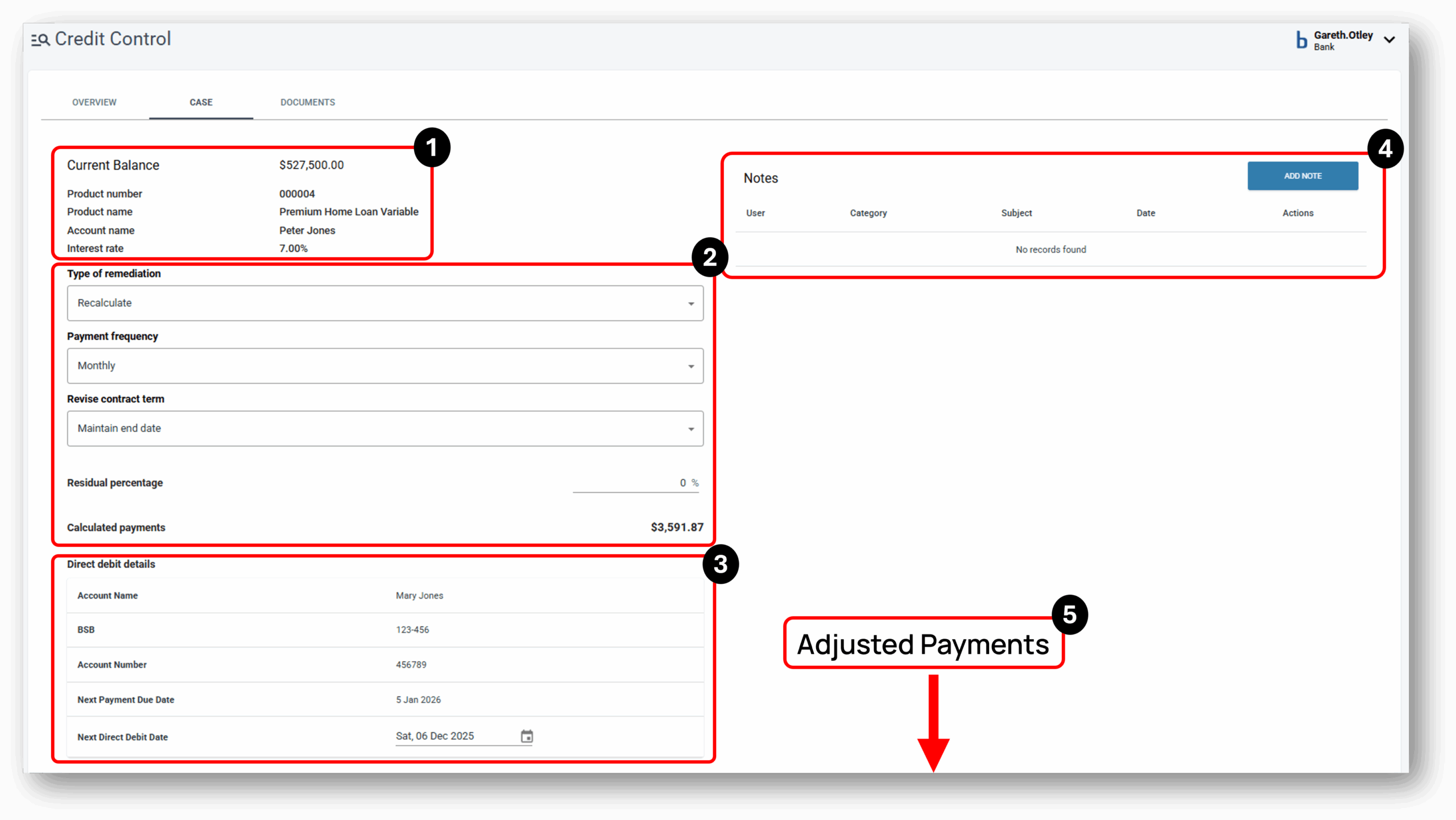
1. Key Account Details: Current Balance, Product reference number, Product Name, Account name, Interest rate
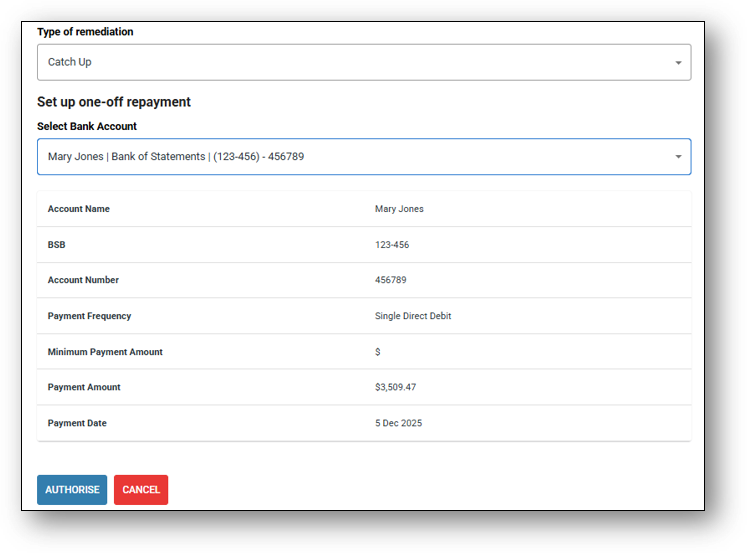
2. Type of Remediation: Recalculate process, Catch-up process, Write-off process
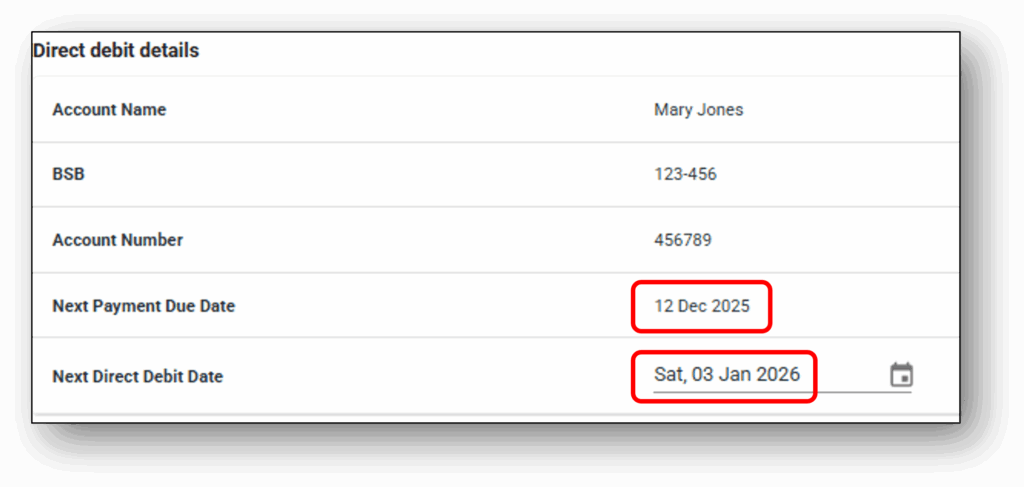
3. Direct Debit Details: If a new account managment strategy has been agreed and accepted by the customer, then use this section to update the new direct debit details. When a customer changes frequency of payments, the next direct debit date should align with the new ‘Next payment due date’ to avoid the account falling back into delinquency.
4. Notes Section: See above in ‘View/Overview’ and in section 2 for further details on the notes section.
5. Adjusted Repayment Schedule: At the bottom of the screen is the repayment schedule for the life of the loan. Any adjustment to the loan is automatically reflected in this schedule as changes are made in the “Type of Remediation“.
Reminder: If increasing the frequency of the repayments i.e moving from monthly to fortnightly, you will need to adjust the direct debit details (Next Direct Debit Date) to align with the new ‘Next Payment Due Date‘. The image below shows an account changing from a monthly frequency to a fortnightly
5. Adjusted Repayment Schedule (Further Explanation): At the bottom of the screen is the repayment schedule for the life of the loan. Any adjustment to the loan is automatically reflected in this schedule as changes are made in the “Type of Remediation“.
1. Recalculate process: When selecting to recalculate the account (Loan), It’s important to note that the new updated repayment figures and dates will recalculate automatically and appear at the bottom of the screen as a future dated schedule based on the next two selections.
- Payment Frequency
- Fortnightly
- Weekly
- Monthly
- Revise contract term
- Revise end date
- Maintain end date
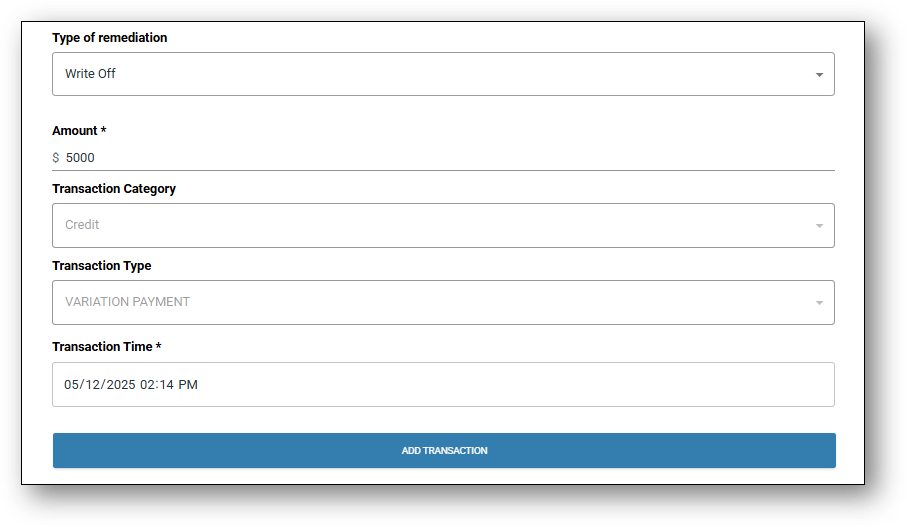
- A write-off means the lender removes the unpaid amount from its books as an asset because it’s deemed uncollectible.
- It’s an accounting action, not a forgiveness of debt—the borrower still legally owes the money unless the lender also agrees to settle or forgive it.
- The amount will appear as a credit on the transaction list with the description ‘Variation Payment’.
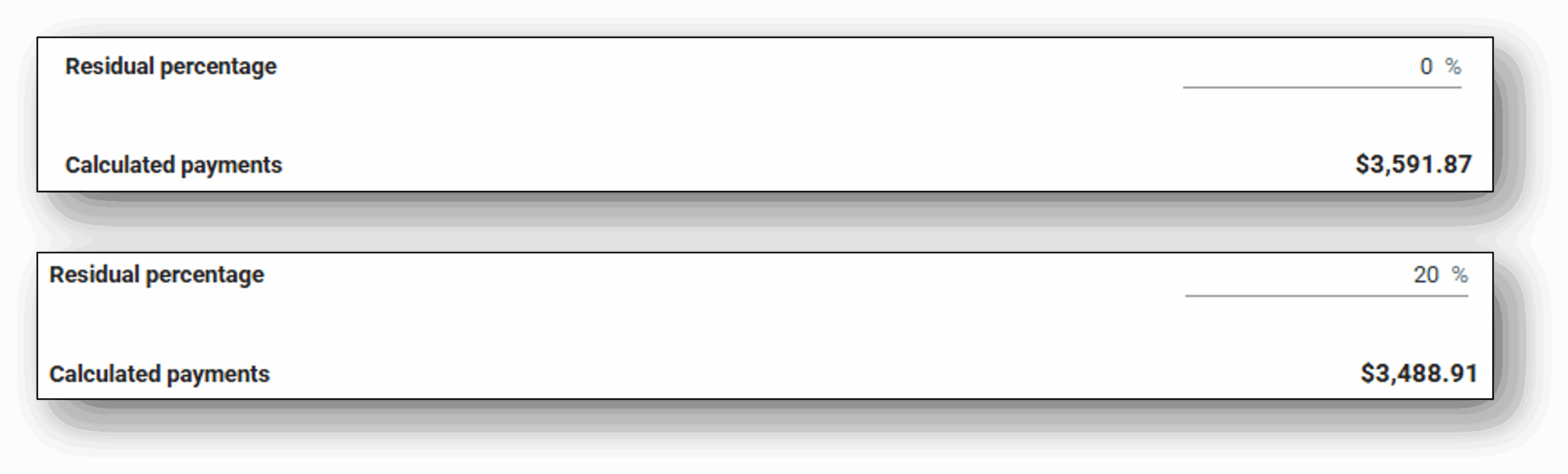
- For a delinquent account (where the borrower is behind on payments), the lender could introduce a residual percentage to restructure the loan.
- Instead of requiring full repayment immediately, the lender could:
- Reduce the regular payments by deferring a portion of the principal (the residual) to the end of the term.
- This makes the monthly payments more affordable for the borrower, helping them get back on track.
- At the end of the term, the borrower would either:
- Pay the residual amount in a lump sum (similar to a balloon payment), or
- Refinance the residual amount into a new loan.
Arrears Calculation logic:
Credit Control will reference the original contractual amount.
Arrears if any, will then be recalculated by comparing the loan amount that should have been paid using the original contractual amount as the baseline against the amount actually paid by the customer. The arrears value will be updated in the Credit Control accordingly.
Credit Control will retain the actual contract loan amount as the single source of truth, while the arrears amount will be dynamically calculated based on the configured direct debit.
Documents
Coming Soon
Frequenty Asked Questions
1. How do I set up and send notifications to delinquent accounts?
This is a two-step process:
STEP-1. First the ‘rules’ in which the delinquency status of a customer abides by need to be setup. To do this, someone from your organisation with the appropriate access to the Risk layer, will need to go into the Delinquency tab and set the rules and notifications templates up. more information can be found in this support site under the Risk layer > Delinquency tab.
STEP-2. The ‘Status’ of each customer is defaulted to ‘Inactive’ to enable you to turn this function on and manage the notifications settings at an individual level (to turn it on for all customers, it’s the same process). To do this, someone from your organisation with the appropriate access to the Reporting layer, will need to go into the Reporting layer > Delinquency (under Servicing Reports) → Set the customers status to Active (More detailed instructions can be found in the same Delinquency tab link in step 1 above).