
Credit Control – Asset Management tab
The Asset Management tab presents a view of the Assts each bank/lender has registered as security.
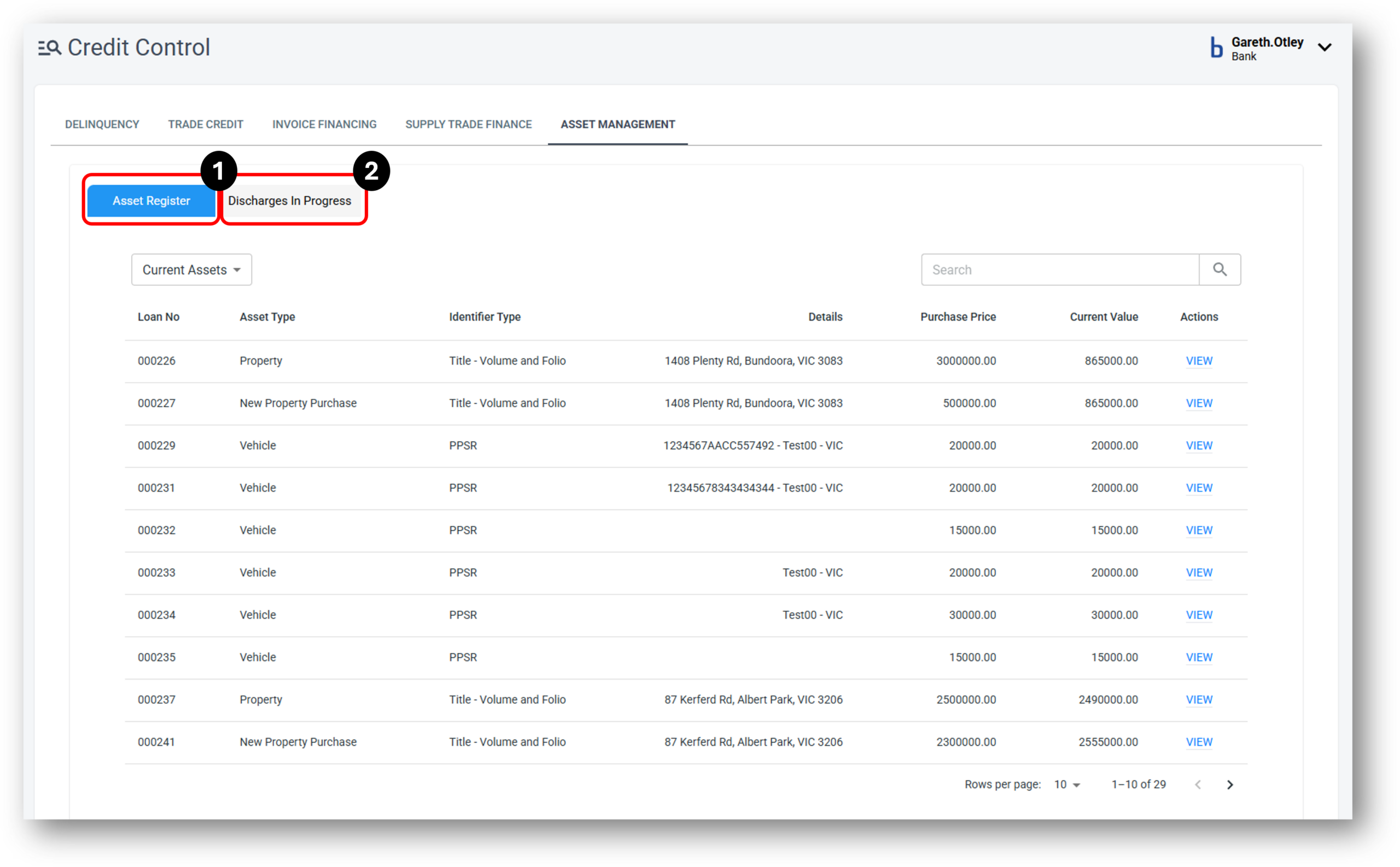

1 - Asset Register
Overview
When a loan is approved and submitted to settlement, all primary assets from will be brought to the Servicing layer. Technically this assets is now tied to the lender as a “Secured” asset.
When a customer wants to get their asset back (by making repayments or any arrangement with the lender), staff will be using this feature to release the security asset and re-calculating loan details.
Go to Credit Control → Asset Management tab. This page will show all security assets from all loans
To release an asset, first, find the customers asset through the search function. Then Click ‘View’ to open the asset details page up.
Click ‘Release Security’ to start the process. On this page, we can see the current loan balance and a entry input for the amount of funds from the release of security.
There is in-built functionality to calculate the new loan details as well.
You can Save the process and revisit later by clicking the ‘Save and close’ button. The assets will now appear in the “Discharge in Progress” tab.
2 - Discharges in Progress
When a user saves and closes the release of security of an asset to be completed later, it will now appear in the “Discharge in Progress” tab awaiting to be actioned.
It can be finalised in this screen by pressing the “Submit Release Security” button and the asset status will be updated to “released” which means the asset is no longer tied to the lender.