
Assessment – Condition tab
The Condition tab houses the applicant’s performance against responsible lending flags, their age and the needs analysis section of their application.
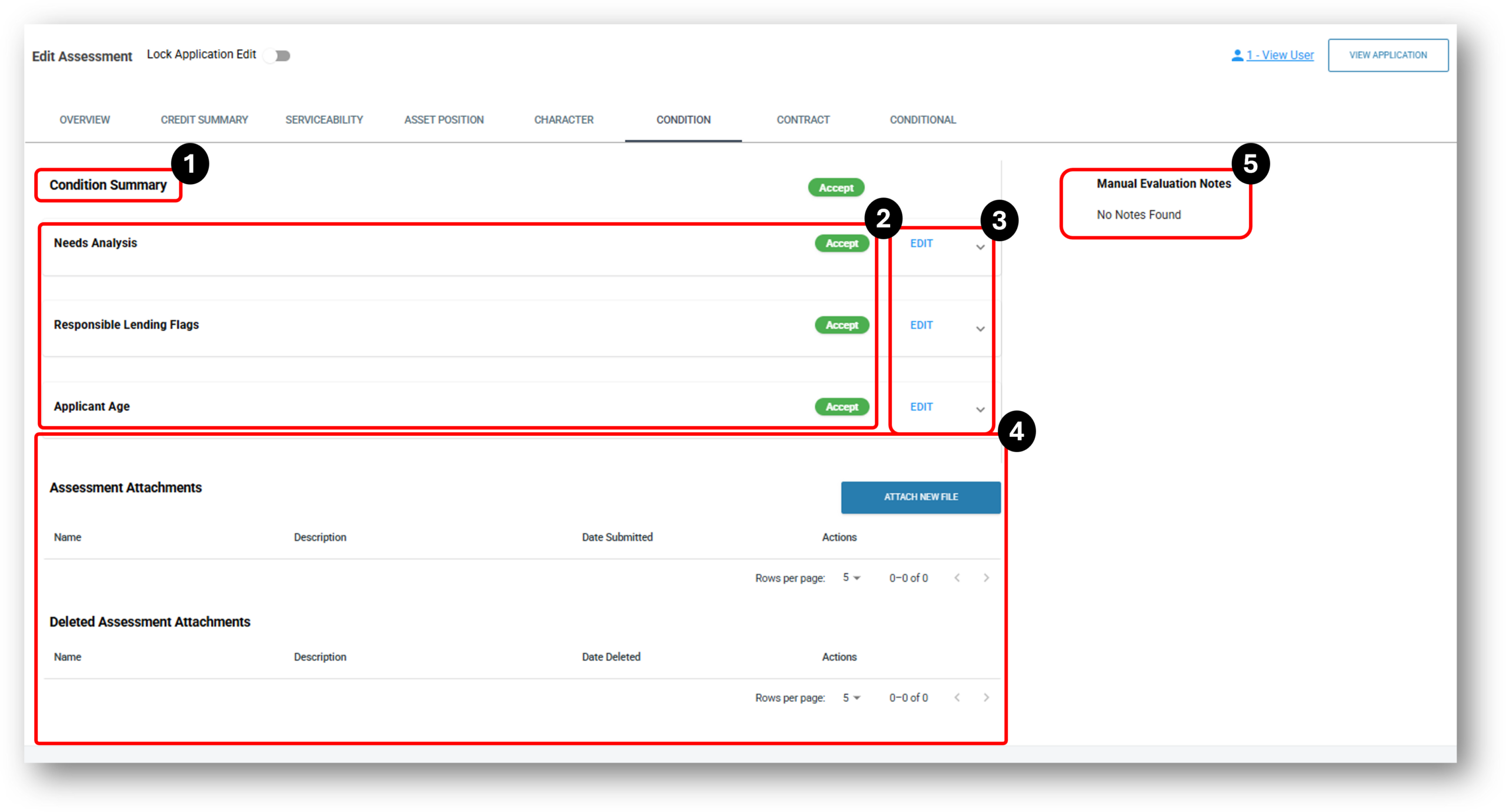

1. Condition Summary
The overall status of this tab. Before the deal can be approved this section will need to show ‘Accept’.
2. Condition Accordions
- Needs Analysis
- Responsible Lending Flags
- Applicants Age
Needs Analysis – Lenders can select OOTB Condition rulesets from the following:
| Metrics | Requirement | Parameters | Actions |
| Requested Loan Amount | NO MORE THAN | $500,000 | EDIT |
| Loan Purpose | IN | EDIT | |
| Purchase Goal | IN | EDIT | |
| Primary Feature | IN | EDIT | |
| Secondary Feature | IN | EDIT | |
| Primary Repayment Intention | IN | EDIT | |
| Secondary Repayment Intention | IN | EDIT | |
| Refinancing | IN | EDIT | |
| Refinancing Years Left | NO MORE THAN | 10 | EDIT |
| At Least $500,000 Assets | EQUAL | Yes | EDIT |
| Receive Pension or Centrelink | EQUAL | No | EDIT |
| Receive Pension Loans Scheme | EQUAL | No | EDIT |
| Refinancing Amount Outstanding | NO MORE THAN | $100,000 | EDIT |
Responsible Lending Flags – Lenders can select OOTB Condition rulesets from the following:
|
Metrics |
Requirement |
Parameters |
Actions |
|
Number of Dishonours |
NO MORE THAN |
1 |
EDIT |
|
Gambling Expenditure – Monthly |
NO MORE THAN |
$3,000 |
EDIT |
|
Gambling Expenditure % – Monthly |
NO MORE THAN |
80% |
EDIT |
|
Collection and Consolidation – Monthly |
NO MORE THAN |
$3,000 |
EDIT |
|
Overdrawn – Monthly |
NO MORE THAN |
$3,000 |
EDIT |
Applicants Age – Lenders can select OOTB Condition rulesets from the following:
|
Metrics |
Requirement |
Parameters |
Actions |
|
Youngest Borrower Lower Age |
NO LESS THAN |
18 |
EDIT |
|
Youngest Borrower Upper Age |
NO MORE THAN |
75 |
EDIT |
3. Edit
In this section, users with the right DLA access, can update the assessment results. The options to change to and from are:
- Accept
- Refer
- Reject
- Exclude
4. Assessment Attachments
Any new supporting files can be attached here ready for an assessor to review. Once attached they can also be deleted and reinstated.
5. Manual Evaluation Notes
When a user with the appropriate access level is updating the assessment outcomes, they will be asked to confirm the reason for the change. Once this is confirmed, the system will leave a manual evaluation note.