Internet Banking – Account Details tab
This tab provides an overview of the customers Account Details screen that they access through their Internet Banking.
Last updated: 06 January 2026
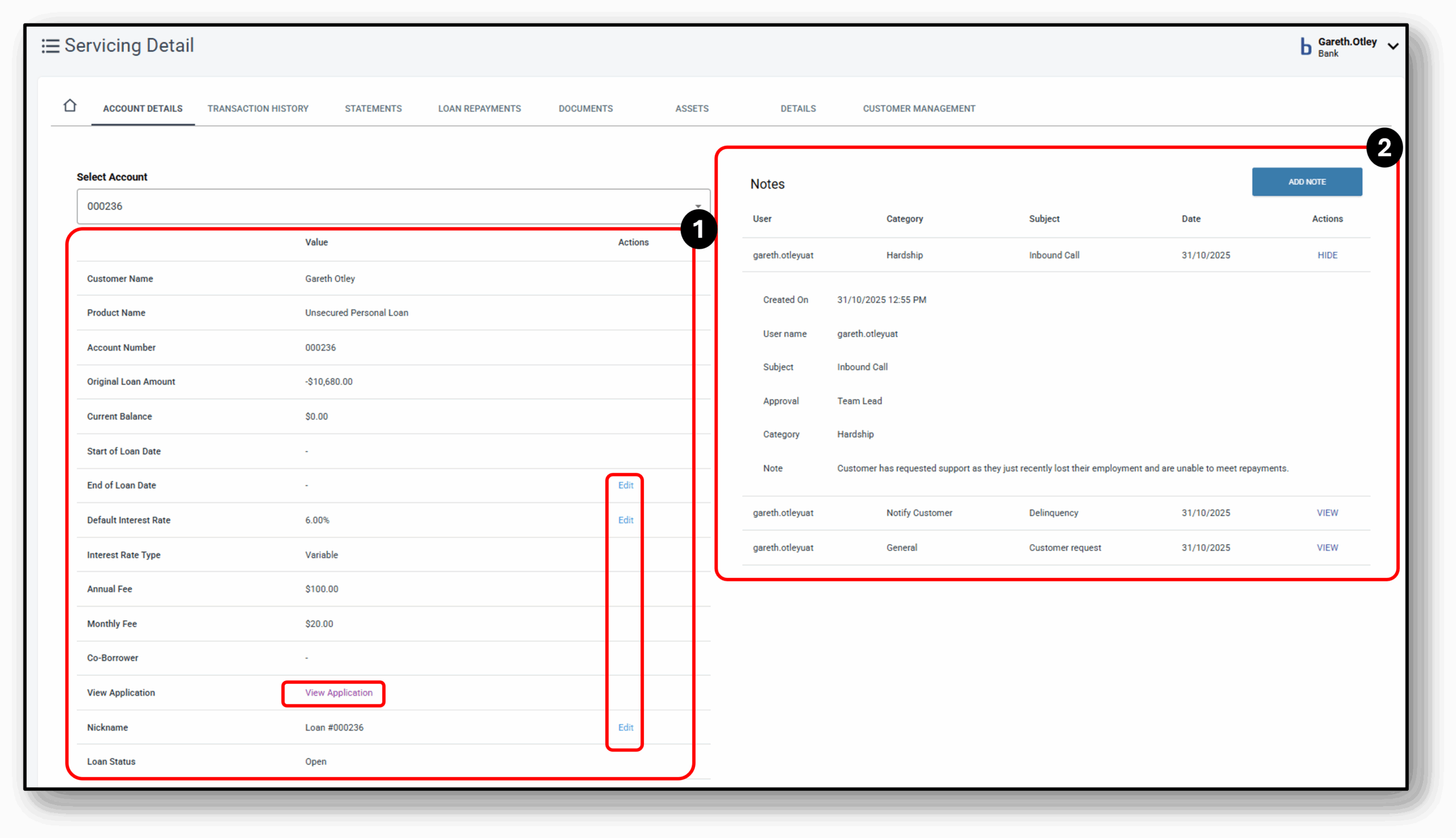

1. Account Details (left)
The main details of the account selected from the drop down. This will include:
- Product name
- Original Loan Amount
- Current Balance
- Start of Loan date
- End of Loan date (editable)
- Default Interest Rate (editable – can either Increase/decrease)
- Interest rate Type
- Any applicable fees
- View application (portal to the Loan Application Layer)
- Nickname of the Loan (editable)
- Loan Status
- Relationship Manager
- Funding Pool (editable)
At the very bottom is the ability to close the account
2. Notes (right)
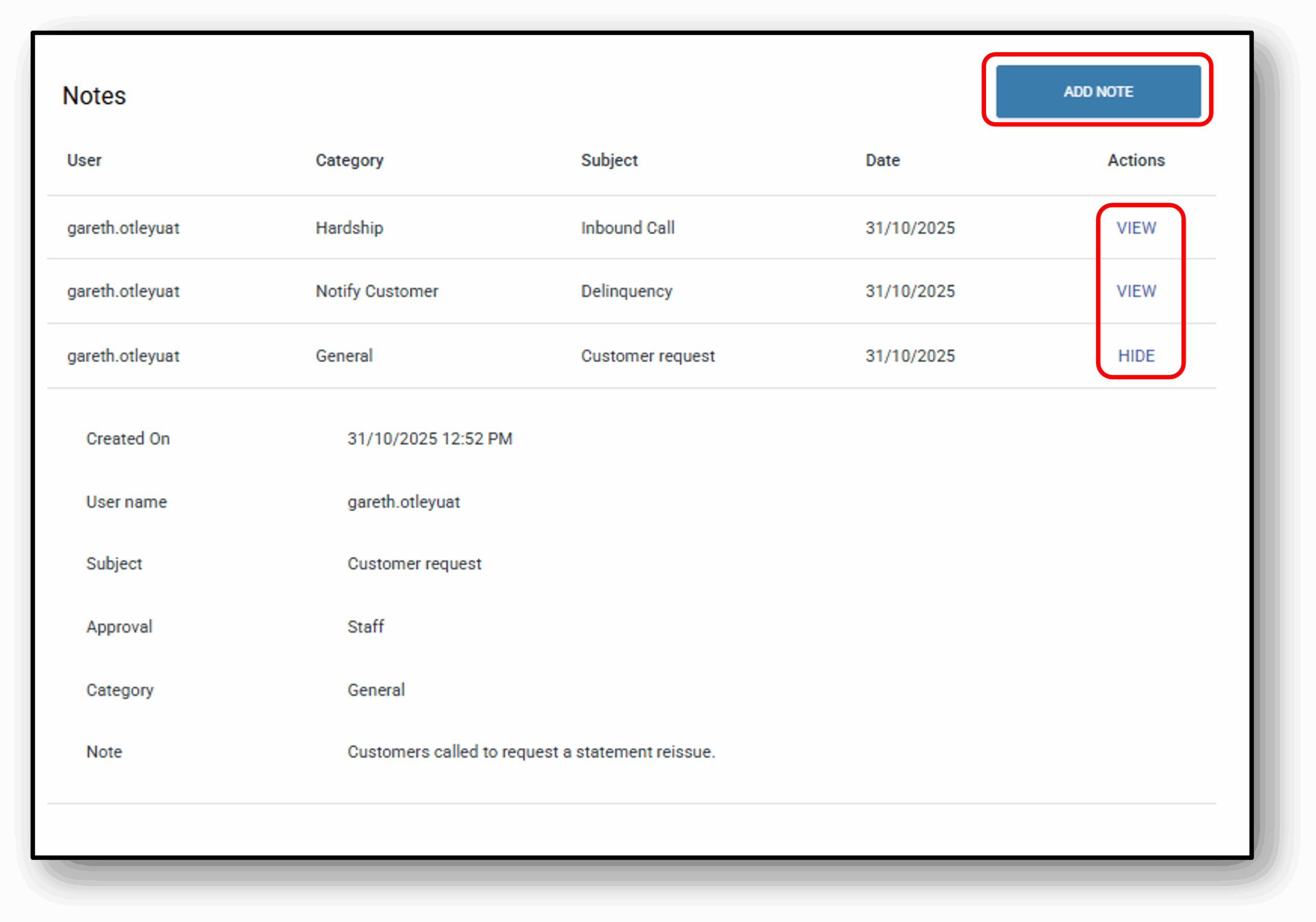
Under the notes section, users will see a condensed view of all previous notes. The condensed view will display:
- User (Name of the person who left the note
- Category (The classification of the note. See below for a full list)
- Subject (The reason the note was added)
- Date (when the the note was created)
- View (Allows the user to expand the note view to see the full details)
When the note is expanded the user will see two more fields:
- Approval (What level user approved the note. In most cases this may just say ‘Staff’ unless a special approval was required)
- Note (the full description of the note itself)
To add a note on the system click the blue ‘Add Note‘ button. Fill in the fields – Category, Subject & Approval. Note, all fields are ‘Required’.

Note Category with example notes:
- General – “Customer called to confirm account balance. No further action required.”
- Broker – “Broker submitted revised application documents on 30/10/2025.”
- Transaction – “Processed payment of $1,250 on 28/10/2025 via BPAY.”
- Interaction – “Spoke with customer regarding loan repayment schedule.”
- Credit – “Credit check completed – score 720, no adverse history.”
- Policy Exception – “Customer allowed to submit documents after deadline per manager approval.”
- Rate Approval – “Rate change request escalated to senior manager for review.”
- Important – “Account under audit – do not process new transactions.”
- Notify Staff – “Please review customer hardship application before COB.”
- Notify Customer – “SMS sent to customer confirming payment received.”
- Dispute – “Chargeback request submitted to card issuer.”
- Warning – “Customer account shows repeated late payments – monitor closely.”
- Fraud – “Suspicious login attempts from overseas IP – account locked.”
- Collections – “Payment arrangement agreed: $500 monthly starting 05/11/2025.”
- Hardship – “Customer applied for hardship due to job loss – documents pending.”
- Write Off – “Debt of $2,000 written off after unsuccessful recovery attempts.”
- Other – “Customer requested product brochure via email.”
Approval will be based on internal authority required for decisions. For example, you may need a ‘Head of Department’ to write off bad debt.